
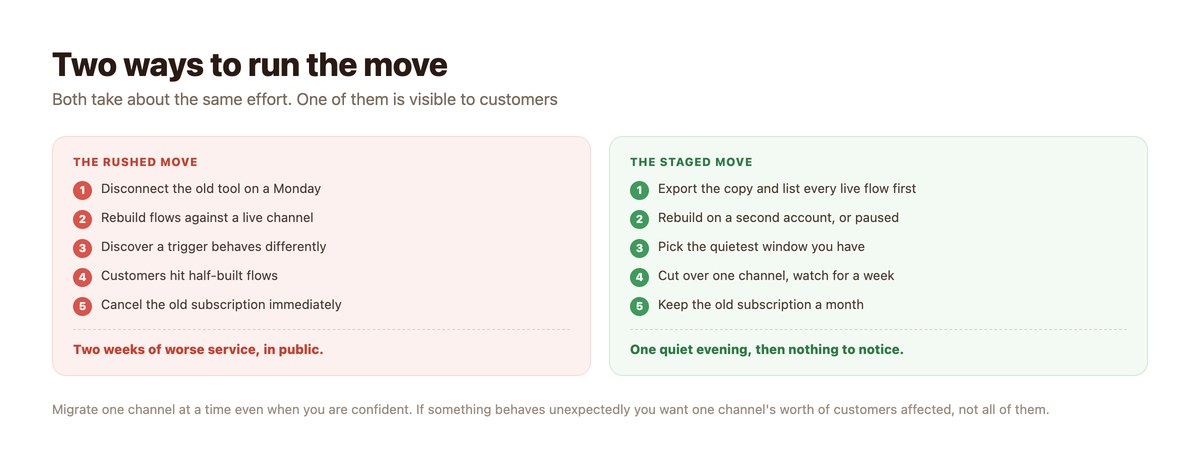
Choosing a different DM automation tool is the easy decision. Moving is the part that goes wrong, and it goes wrong in a specific way: the flows get rebuilt against a live channel while real customers are walking into them.
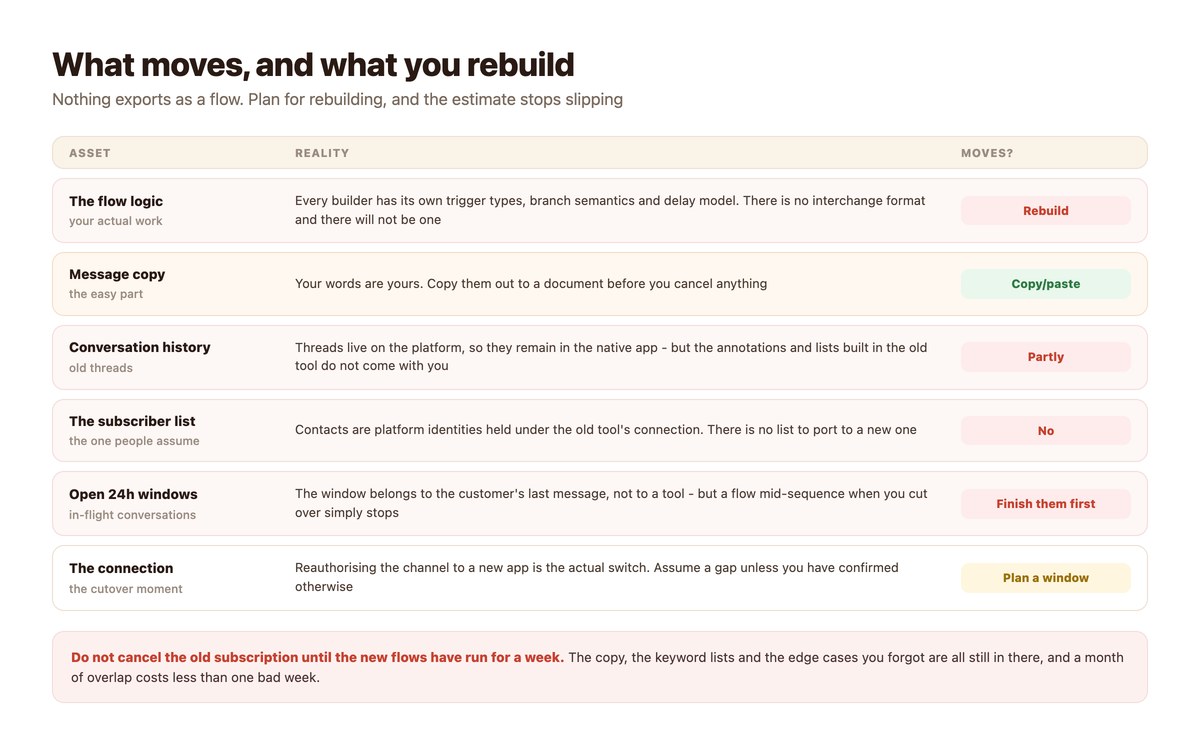
Nothing in this category exports. There is no interchange format for flow logic, there is no subscriber list to port, and the switch itself is a reauthorisation of the channel rather than a settings change. None of that is a problem if you plan for it, and all of it is a problem if you discover it on the day.
This is the how, not the which – the comparison between tools is a different question. Below: what transfers, the order that works, and the week after.
Key takeaways
- Flow logic does not export. Every builder has its own trigger types and branch semantics, so budget for a rebuild rather than an import.
- There is no subscriber list to port. Contacts are platform identities held under the old tool’s connection.
- Your message copy is yours – export it to a document before you cancel anything.
- The cutover is a channel reauthorisation. Assume a gap unless you have confirmed both tools can be connected at once.
- Let in-flight sequences finish before you switch, or they simply stop mid-conversation.
- Migrate one channel at a time, starting with your quietest.
- Keep the old subscription for a month after cutover. It is cheaper than one bad week.
What Actually Transfers
Less than people expect, and the gap is mostly in one place.
Not the Flows
There is no export format for automation logic and there is not going to be one. Trigger types differ, branch semantics differ, delay models differ, and the way each tool decides whether a keyword matched differs – exact, word or contains are not the same rule, and a flow that worked on one setting behaves differently on another.
The practical consequence is that the estimate should be a rebuild estimate. Teams that budget for an import spend the saved time on an unpleasant surprise instead.
Yes to the Copy
The words are yours and they represent most of the thinking. Before anything else, open every live flow and paste the message text into a document, keyword lists included.
This is twenty minutes of dull work that makes the rebuild four times faster, and it is the single step most often skipped because it feels like procrastination.
Not the Subscriber List
The contacts in a DM tool are platform identities that were reachable because the platform delivered their messages to that tool’s connection. They are not a mailing list and there is nothing to download and upload elsewhere.
This surprises people who have been shown a contact count in a dashboard. The count is real; the portability is not. The underlying reason is the same one that prevents cross-channel identity, set out in the unified social inbox.
Partly the History
Conversation threads live on the platform, so they remain visible in the native apps regardless of which tool you use. What does not come with you is everything layered on top – lists, notes, tags and whatever structure your team built around the threads.
If those annotations matter, export what you can before the cutover, because access ends with the subscription.
The Cutover Itself
The five minutes that decide whether anybody notices.
It Is a Reauthorisation
Switching tools means pointing the channel at a different application. That is a platform-side action, not a setting inside either product, and it is the moment automations stop running on one side and start on the other.
Whether both tools can hold a connection simultaneously depends on the channel and on how each app is configured. Confirm it rather than assuming it – and in the absence of confirmation, plan a clean cutover with a short gap rather than an overlap you have not tested.
Let In-Flight Sequences Finish
Anybody halfway through a multi-step flow when you disconnect is left there. The customer does not see an error; they see a conversation that stopped.
Pause new entries into long sequences a day or two before the move and let the existing ones complete. Short flows resolve in minutes; follow-up sequences with day-scale delays are the ones to watch.
Pick the Quiet Window, Per Channel
Your own data says when. The lowest-volume hours of your lowest-volume channel are where this should happen, and the channel order should run from quietest to busiest so that each problem is discovered cheaply.
Doing all channels in one evening feels efficient and removes your ability to learn anything between them.
The Week After
Where the actual failures turn up, none of them dramatic.
Watch the Unmatched Pile
The commonest post-migration problem is a keyword that used to match and now does not, because the match mode is different. Nothing errors – messages simply fall through to whatever your catch-all does.
So the number to watch in week one is not successful sends. It is conversations that reached no flow at all. If that number rose, your keyword rules did not come across as intended.
Re-Test the Integrations
Webhooks need their URLs re-entered, store connections need reauthorising, and calendars need relinking. Each is quick and each fails silently if missed – the lookup just stops returning anything.
Run one real test per integration rather than trusting the connected badge, using the approach in social inbox integrations.
Keep the Old Subscription a Month
One month of double subscription is the cheapest insurance in this whole process. The flows you forgot, the seasonal campaign nobody mentioned and the exact copy of a message you liked are all still in there.
Cancel after a full cycle of your normal business, not after a quiet week.
Migration Checklist
In order. The first three happen before anything is disconnected.
| Step | When | Why it is in this position |
|---|---|---|
| Export all message copy | Before anything | Twenty minutes that saves the rebuild |
| List every live flow and its trigger | Before anything | You will find two nobody remembered |
| Rebuild, paused | Before cutover | Never build against a live channel |
| Pause entry to long sequences | Two days before | So nobody is stranded mid-flow |
| Cut over the quietest channel | Quiet hours | Learn cheaply |
| Watch unmatched conversations | Week one | Keyword rules are what silently differ |
| Re-test every integration | Week one | They fail silently, not loudly |
| Cancel the old tool | After a month | A full business cycle, not a quiet week |
If several people answer, agree who owns the watch in week one – the ownership models are in assigning conversations to a team.
A Realistic Schedule
Two weeks elapsed, about two days of actual work.
- Week one, day one: export copy and inventory flows. Every live automation, its trigger, its keywords and its match mode.
- Week one, days two to three: rebuild, paused. On the new tool, switched off. Compare against the inventory rather than memory.
- Week one, day four: dry-run on a test account. Trigger each flow yourself. Match modes are where behaviour differs.
- Week two, day one: pause entry to long sequences. Let anybody mid-flow finish before the connection moves.
- Week two, day two: cut over the quietest channel. Quiet hours. Watch it for a full day before touching the next.
- Week two, rest: one channel per day, busiest last. Then watch unmatched conversations for a week before cancelling anything.
Doing It With DMpro
What makes the rebuild shorter, and what is still a rebuild.
Rebuild Once, Run Everywhere It Fits
DMpro uses the same visual builder across Instagram, TikTok, WhatsApp, Messenger, Telegram and Discord – triggers, conditions, delays, branches, product cards, webhooks and AI responses – so a flow designed once covers the channels that support each step.
Campaigns can also be bulk-created from a spreadsheet, which is worth knowing if your inventory is long and repetitive.
Check Three Things Against Your Old Setup
Keyword match mode, because word, contains and exact are genuinely different rules and the default is word. Delay units, which run from seconds to fifteen days. And the per-recipient cooldown, which stops the same person being contacted repeatedly.
Those three account for most “it behaves differently now” reports.
Capability Differences Are Platform Ones
AI responses run on Instagram, TikTok, Telegram and Discord – not WhatsApp, not Messenger. Product cards do not send on TikTok. If a flow you are porting relies on one of those, it needs redesigning rather than recreating.
Move Once, Quietly
Migrations are not hard. They are badly sequenced – rebuilt live, cut over all at once, and the old subscription cancelled the same afternoon.
DMpro gives you one builder across every channel, bulk campaign creation from a spreadsheet, and one queue to watch while you move – so the cutover is an evening rather than a fortnight.
Conclusion
Assume a rebuild. Flow logic does not export between tools, subscriber lists are not portable, and the switch itself is a channel reauthorisation – none of which is a problem on a planned day and all of which is a problem on an unplanned one.
Export the copy first, rebuild paused, let in-flight sequences finish, and cut over one channel at a time starting with the quietest. That is the whole method and it costs about two days spread across two weeks.
Then watch the unmatched pile rather than the success count, re-test every integration by hand, and keep the old subscription for a full month. Nobody has ever regretted the extra month.
Frequently asked questions
Can I export my flows from ManyChat to another tool?
No. There is no interchange format for automation logic between DM tools – trigger types, branch semantics and keyword match rules all differ – so budget for a rebuild rather than an import.
Do my subscribers transfer when I switch tools?
No. Contacts in a DM tool are platform identities reachable through that tool’s connection, not a mailing list you own and can upload elsewhere.
Will I lose my conversation history?
The threads themselves live on the platform and stay visible in the native apps. What you lose is everything layered on top by the old tool – lists, notes and tags – so export those before the subscription ends.
How long does a migration take?
About two days of work spread over two weeks: a day to inventory and export copy, a day to rebuild paused, then one channel cut over per day starting with the quietest.
Should I run both tools at once?
Whether two tools can hold the same channel connection depends on the channel and the app setup. Confirm it before relying on it, and otherwise plan a clean cutover during quiet hours.
What breaks most often after a migration?
Keyword matching. Match modes differ between tools, so messages that used to trigger a flow quietly fall through instead. Watch unmatched conversations for the first week, not successful sends.