
People search for LinkedIn’s connection request limit in order to send right up to it. That is an understandable goal and it is aimed at the wrong mechanism.
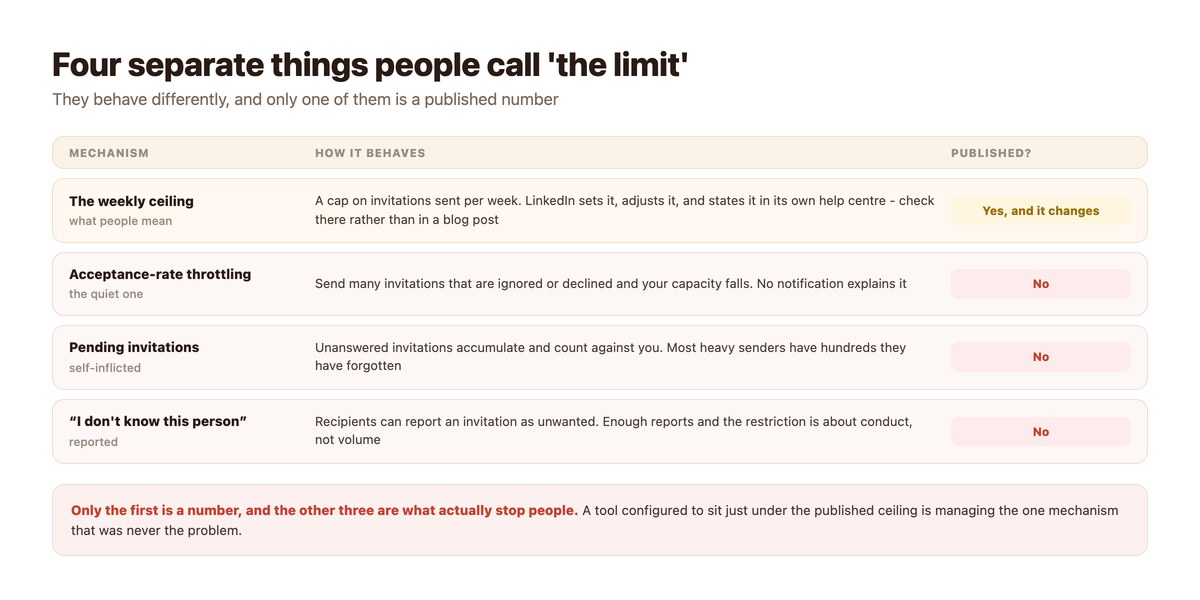
There are four separate things people call the limit. One is a number LinkedIn publishes and adjusts. The other three are behavioural: capacity that falls when invitations go unanswered, a pending pile that accumulates and drags, and reports from recipients who did not want the request. Those three are what actually stop accounts, and none of them is a number you can configure a tool against.
Check the current published figure in LinkedIn’s own help centre rather than in any article, including this one – it changes, and a number quoted elsewhere is a number going out of date. What follows is how the mechanisms behave and what follows from that.
Key takeaways
- Four mechanisms, one number. The weekly ceiling is published; throttling, pending invitations and reports are not.
- Check LinkedIn’s own help centre for the current figure – it is adjusted, and articles quoting it go stale.
- Capacity follows acceptance. Invitations that get ignored reduce what you can send later.
- Unanswered pending invitations accumulate and count against you. Withdraw them monthly.
- Recipients can report an invitation as unwanted, which turns a volume question into a conduct one.
- A tool tuned to sit under the published ceiling is managing the one mechanism that was never the constraint.
- And automating invitations is restricted regardless of volume – the ceiling is not permission.
The Four Mechanisms
They get discussed as one and behave nothing like each other.
The Weekly Ceiling
A cap on how many invitations an account may send in a week. LinkedIn sets it, states it in its help centre, and changes it when it chooses – it has moved before and will move again.
Look it up at the source. The figure in any given article is a snapshot of whenever that article was written, repeated confidently long after it stopped being accurate.
Acceptance-Rate Throttling
The mechanism most people run into and almost nobody identifies. Send a lot of invitations that are ignored or declined, and your capacity quietly falls. There is no notification and no stated reason.
The usual interpretation is that LinkedIn has got harder or the market has gone quiet. The actual cause is a signal the account has been generating for weeks.
The Pending Pile
Invitations nobody answered do not disappear. They accumulate, they count, and heavy senders routinely have hundreds outstanding from months ago.
Withdrawing invitations that have sat for a month is the single most effective bit of hygiene available here, it takes a few minutes, and it is rarely done because nothing prompts it.
Recipient Reports
A person receiving an invitation can indicate they do not know the sender or do not want the request. Enough of those and the issue stops being volume and becomes conduct, which is a different and less recoverable category.
This is the mechanism that makes generic bulk invitations dangerous regardless of how far below the ceiling they sit.
Why Optimising Against the Number Backfires
The strategy and the mechanism point in opposite directions.
Volume Lowers Acceptance, Acceptance Governs Capacity
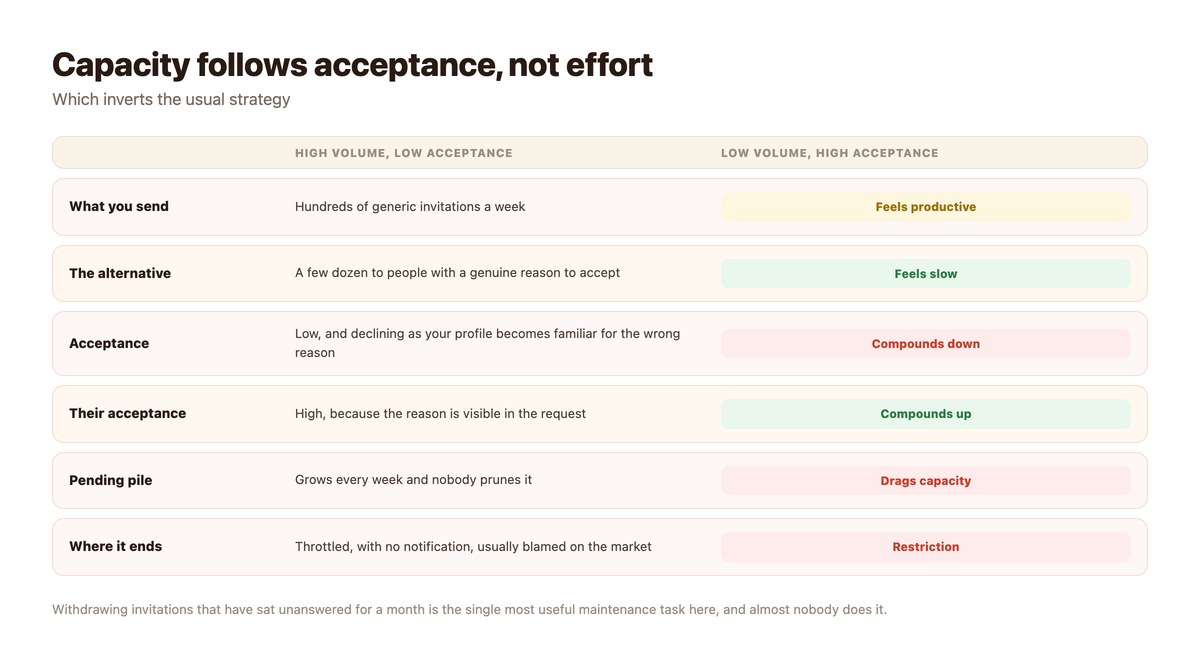
Sending to the ceiling means sending to people with a weaker reason to accept, which lowers your acceptance rate, which reduces capacity. The strategy degrades itself, and it does so slowly enough that the cause is rarely connected to the effect.
The inverse also compounds: a smaller number of invitations with a visible reason to accept raises the rate and the capacity along with it.
A Cap Is Not Permission
Worth being explicit, because the two get conflated constantly. The existence of a published ceiling says how many invitations an account may send. It says nothing about whether software may send them on your behalf, which is addressed separately and restricted.
A tool that promises to keep you under the limit is answering a question nobody was enforcing – the reasoning is in LinkedIn automation rules.
The Limit Is Not Your Bottleneck Anyway
Most businesses never reach the weekly ceiling, because they cannot find that many people worth inviting with a genuine reason. When the ceiling is the binding constraint, the invitations have usually stopped being considered.
If volume is the actual requirement, LinkedIn is the wrong channel for it – the permitted alternatives are in LinkedIn outreach alternatives.
Hygiene That Actually Helps
None of this is clever. All of it is skipped.
| Task | How often | Effect |
|---|---|---|
| Withdraw invitations older than a month | Monthly | Directly reduces the pending drag |
| Write a reason into the request | Every time | The largest single lever on acceptance |
| Invite people who have interacted with you | Prefer it | Acceptance is far higher and reports near zero |
| Stop inviting from scraped lists | Now | Generic invitations generate reports |
| Check your acceptance rate | Monthly | It is the leading indicator of throttling |
| Look up the current ceiling at the source | When it matters | Articles go stale; the help centre does not |
People who commented on your posts are the warmest invitations available, which is one more reason the comment mechanic in LinkedIn comment automation is worth running.
Repairing a Throttled Account
No guarantees – but this is the order that gives it the best chance.
- Stop any automation immediately. Continuing while you repair is the thing preventing the repair.
- Withdraw every invitation older than a month. This is the one action with a direct, immediate effect on the pending drag.
- Stop inviting strangers entirely for a few weeks. Invite only people who have interacted with you or whom you have met.
- Write a real reason in every request. One sentence referencing something specific. Acceptance climbs quickly.
- Watch the acceptance rate, not the send count. It is the signal the platform is responding to.
- Rebuild volume on a channel that permits it. LinkedIn is not going to become an outbound volume channel.
Where DMpro Sits
Not in this part of the problem at all, which is the point.
No Invitations, No DMs
DMpro does not send LinkedIn DMs. The connection is comment-trigger only, DM sending is switched off in configuration, and LinkedIn is the one platform shipped disabled by default. There is no connection-request feature either – the LinkedIn surface is comment triggers and public replies on your own company page.
So none of the four mechanisms on this page applies to using DMpro on LinkedIn, because none of the activity they govern is something it does.
What It Does Instead
Comment automation on your company page generates the warmest invitations available: people who engaged with your content publicly and have a reason to recognise your name.
Inviting those people, by hand, with a sentence about what they said, is the version of this that compounds upward rather than down.
If You Need Outbound Volume
contactID reaches companies through their published contact forms – a channel organisations maintain precisely so that people who do not know them can make contact, with no invitation ceiling involved.
Stop Optimising Against the Wrong Number
The weekly ceiling is the only published limit and the least important one. What throttles accounts is ignored invitations, an unpruned pending pile and recipients reporting requests they did not want.
DMpro does not send invitations or LinkedIn DMs. It automates comment replies on your company page – which produces people who already know who you are.
Conclusion
Four mechanisms get called the limit and only one is a number. Look that one up at LinkedIn’s own help centre when you need it, because it changes and every article quoting it is a snapshot.
The other three are behavioural and they are what actually stops people: capacity falls when invitations are ignored, the pending pile accumulates, and recipients can report requests they did not want. A tool tuned to sit under the ceiling manages none of them.
Write a reason into every request, withdraw the ones nobody answered, and invite people who have interacted with you. That is slower than any automation offers and it is the version where capacity grows instead of quietly disappearing.
Frequently asked questions
What is LinkedIn’s connection request limit?
There is a published weekly invitation ceiling, and LinkedIn adjusts it – check its own help centre for the current figure rather than an article. Three other mechanisms are unpublished and matter more.
Why have my invitations been throttled?
Usually because too many went unanswered or declined. Capacity is sensitive to acceptance rate, and the reduction arrives without any notification explaining it.
Do pending invitations count against me?
Yes. Unanswered invitations accumulate, and heavy senders often have hundreds outstanding. Withdrawing anything older than a month is the most effective maintenance available.
Does staying under the limit make automation safe?
No. The ceiling governs how many invitations an account may send; it says nothing about whether software may send them, which LinkedIn’s User Agreement restricts separately.
How do I raise my acceptance rate?
Write a specific reason into the request, and prefer people who have interacted with you – someone who commented on your post is far more likely to accept than a name from a list.
What should I do if my account is already restricted?
Stop any automation, withdraw old pending invitations, invite only people who know you for a few weeks, and watch acceptance rather than volume. Recovery is possible and not guaranteed.