
Search for LinkedIn automation and almost everything you find is selling the same thing: automated connection requests and DM sequences, usually with reassuring language about safe daily limits and human-like delays.
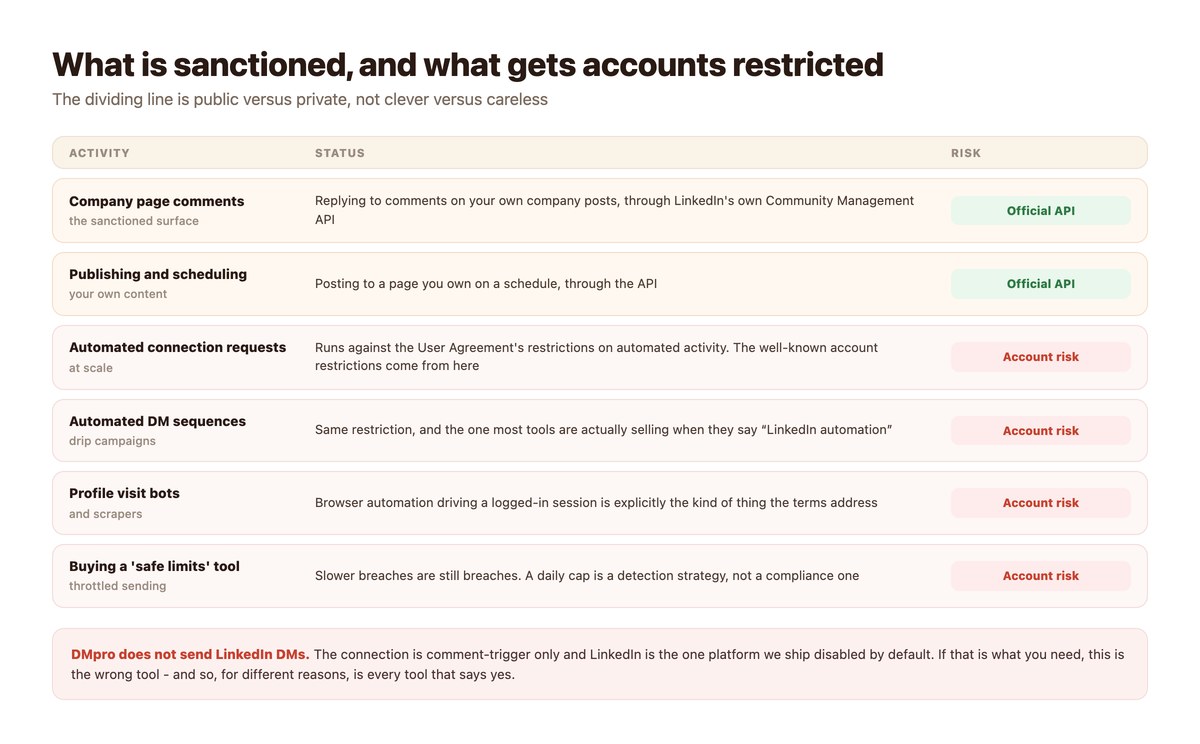
That category of tool operates against LinkedIn’s User Agreement, which restricts automated activity on the platform. The daily caps are not a compliance measure – they are an attempt to stay below detection, which is a different thing and works until it does not. The accounts that get restricted are not the careless ones; they are the ones that were doing this at all.
There is a sanctioned surface, it is smaller, and it is public: company pages, posts and comments, through LinkedIn’s own Community Management API. This page covers what that surface can do, what it cannot, and what to do instead when what you actually need is a conversation.
Key takeaways
- LinkedIn’s User Agreement restricts automated activity. Connection bots, DM sequences and profile-visit tools operate against it.
- “Safe daily limits” are a detection strategy, not a compliance one. A slower breach is still a breach.
- The sanctioned surface is public: company page posts and comments, through LinkedIn’s own Community Management API.
- DMpro does not send LinkedIn DMs. The connection is comment-trigger only, and LinkedIn ships disabled by default.
- What works: a comment on your company post triggers a public reply with a tracked link, and a webhook can personalise it.
- AI replies, attachments, cards and products are all unavailable on this channel.
- If you need an actual conversation at scale, the honest routes are contact forms or a channel built for messaging – not LinkedIn DMs.
The Line Is Public Versus Private
Not careful versus careless, which is how the tools frame it.
What the Terms Actually Restrict
LinkedIn’s User Agreement restricts automated activity on the platform – software driving a logged-in member session, scraping, and bulk automated outreach. That covers connection-request tools, DM sequencers and profile-visit bots regardless of how slowly they run.
The important part is that this is a terms question rather than a technical one. There is no configuration that makes a prohibited activity permitted, which is why every vendor in that category talks about limits rather than about permission.
Why “Safe Limits” Is the Wrong Frame
A daily cap reduces the chance of being noticed. It does not change what the activity is. Vendors who lead with caps are telling you, accurately, that the risk is detection – and inviting you to accept it on behalf of an account you depend on.
The asymmetry is what makes it a poor trade: the upside is some extra outreach volume, and the downside is a restricted account carrying years of professional history.
What Is Sanctioned
LinkedIn publishes a Community Management API for company pages. It covers your own page: publishing, and reading and replying to comments on your own posts. Everything through it is a public action on property you control, performed with LinkedIn’s permission.
It is a much smaller surface than the bots offer, and it is the entire sanctioned set.
What the Sanctioned Surface Can Do
Small, and more useful than it first appears.
Comment Triggers on Your Own Posts
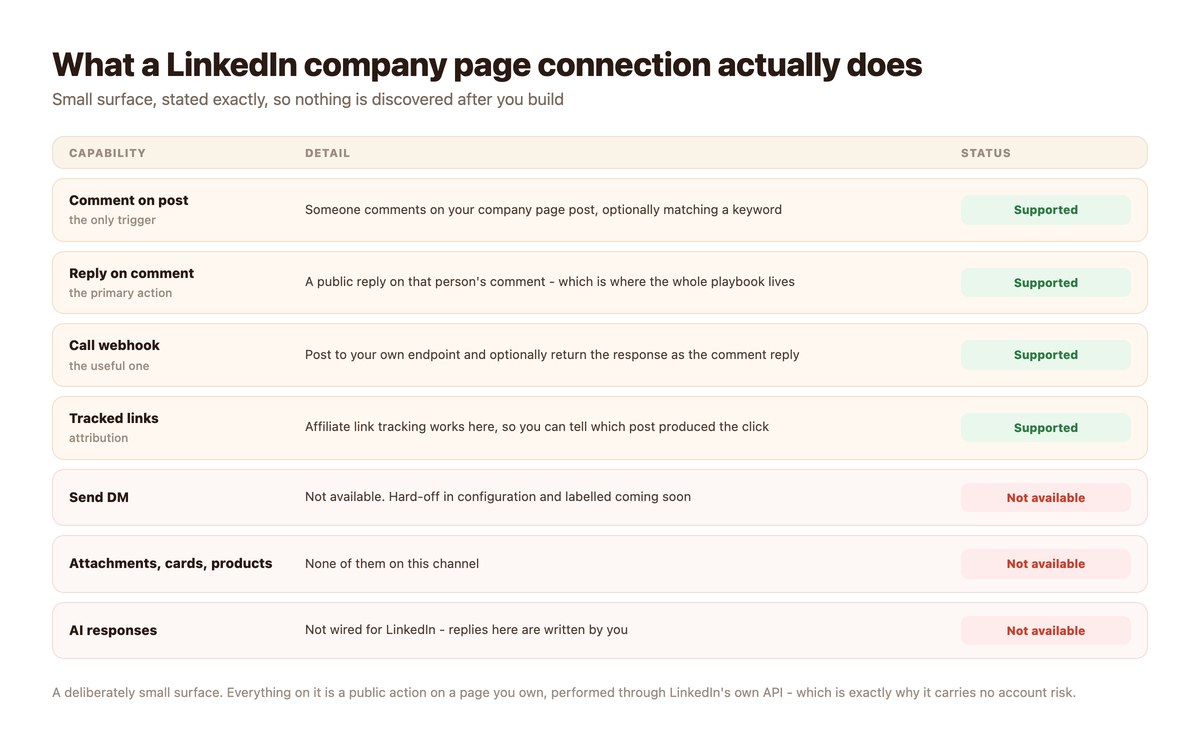
Someone comments on a company page post, optionally matching a keyword you chose, and an automation replies publicly on their comment. That is the mechanic, and it is the same one that works so well on Instagram – a post does the reach, the comment signals interest.
On LinkedIn the follow-through differs, because the reply stays public. Which is not only a limitation: a useful public answer is visible to everybody else reading the thread, and on a B2B post that audience is the point.
A Tracked Link in the Reply
Link tracking works on this channel, so a reply carrying a resource link tells you which post produced the clicks. For B2B content where attribution is usually guesswork, that is a real measurement rather than an inferred one.
The standard shape: post something substantive, invite a keyword in the comments, reply publicly with the link to the full thing.
A Webhook for the Personal Touch
A webhook can post to your own endpoint and return its response as the comment reply, which means the public answer can be drawn from your own data rather than being a fixed string.
The mechanics are the same everywhere and are set out in webhooks and integrations.
What It Cannot Do, Stated Plainly
Because the point of this page is that somebody should be saying it.
No DM Sending
DMpro does not send LinkedIn DMs. The capability is switched off in configuration and labelled as coming soon, and LinkedIn is the one platform we ship disabled by default rather than enabled.
If automated LinkedIn DMs are the requirement, this is the wrong tool. It is also worth knowing that the tools which say yes are offering you the activity the User Agreement restricts.
No AI Replies, No Attachments, No Cards
AI responses are not wired for LinkedIn. Attachments, product cards and rich sends are unavailable. Multi-step paths and wait-for-reply are limited compared with the other channels.
In practice the channel is one trigger and one action, plus a webhook. Design for that rather than discovering it.
No Personal Profile Automation
The connection is to a company page, not to a person’s profile. Nothing here automates your own account’s activity, which is deliberate – that is precisely the boundary the User Agreement draws.
If You Need Something LinkedIn Will Not Give You
Three honest alternatives, depending on what you actually need.
| You need | Honest route | Why |
|---|---|---|
| Reach decision-makers at target companies | Contact-form outreach | A published channel intended for enquiries, with no account risk |
| A conversation at scale | A messaging channel built for it | Instagram, WhatsApp and the rest permit it; LinkedIn does not |
| Follow up on content engagement | Company page comment automation | Sanctioned, measurable, and public engagement is the B2B point |
| Nurture a known contact | Email, with their consent | Boring, permitted, and it works |
| Automated LinkedIn DMs | Nothing honest | The platform restricts it; tools offering it accept your risk |
Contact-form outreach is a different motion with different rules – contactID is built for it, and it works on channels companies publish precisely so that people will use them.
Setting Up What Does Work
An afternoon, and it is genuinely worth doing.
- Connect the company page, not a profile. Through LinkedIn’s Community Management API OAuth. Enable the channel – it is off by default.
- Write a post worth commenting on. The automation amplifies a good post and cannot rescue a weak one.
- Pick one keyword and say it explicitly. ‘Comment GUIDE and I’ll send the link.’ Clarity beats cleverness on this channel.
- Write the public reply as though everyone will read it. They will. On LinkedIn the reply is content, not a delivery mechanism.
- Use a tracked link. So you learn which posts produce clicks rather than guessing.
- Leave the real conversations to people. A comment thread that turns into a genuine question is a human’s job.
Doing It With DMpro
Exactly what is supported, with no rounding up.
Company Page Comment Automation
DMpro connects a LinkedIn Company Page through the Community Management API. The trigger is a comment on one of your posts, optionally keyword-matched; the actions are a public reply on that comment and a webhook call that may return its response as the reply. Tracked links work.
That is the complete surface and we would rather you knew it before signing up than after.
Disabled by Default, On Purpose
LinkedIn is the one platform seeded disabled. You enable it deliberately, which reflects both the narrower capability set and the fact that this channel deserves a conscious decision rather than a default.
Where the Rest of Your B2B Motion Goes
For outreach that needs to start a conversation, contactID works through company contact forms – a channel published for exactly that purpose. For inbound across the channels that permit messaging, the one-queue model is in the unified social inbox.
The Rest of This Guide
Ten pages on doing B2B properly, including the ones that say no.
- LinkedIn automation rules — what the User Agreement says, in plain language
- LinkedIn automation tools and risk — what ‘safe limits’ actually means, and what restriction looks like
- LinkedIn comment automation — the sanctioned playbook, step by step
- LinkedIn content to DM — moving a public thread into a private conversation, by hand
- Connection request limits — the real numbers, and why automating against them is the problem
- LinkedIn lead generation — generating leads without automating the inbox
- B2B DM outreach — which channels permit it, and which do not
- LinkedIn outreach alternatives — contact forms, email and the channels built for messaging
- LinkedIn vs Instagram outreach — two platforms with opposite rules about automation
- Social selling playbook — the version that does not depend on bots
The LinkedIn Automation That Does Not Risk Your Account
Connection bots and DM sequencers are selling you an activity LinkedIn restricts, with a daily cap in place of permission. The sanctioned surface is smaller and it is public: your company page, your posts, your comment threads.
DMpro automates that surface through LinkedIn’s own API – keyword comment triggers, public replies and tracked links – and does not pretend to send LinkedIn DMs.
Conclusion
The honest summary of LinkedIn automation is that most of what is sold under that name operates against the platform’s User Agreement. Safe daily limits manage detection, not permission, and the account at risk is one carrying years of professional history.
What is sanctioned is public: company page posts and comments, through LinkedIn’s own API. Keyword comment triggers, public replies and tracked links – a small set that happens to fit how B2B content actually works, because a useful public answer is read by everyone in the thread.
And when you genuinely need to start conversations at scale, go where that is permitted. Contact forms exist for enquiries, the messaging channels permit messaging, and “there is no honest route” is a legitimate answer rather than a gap for a tool to fill.
Frequently asked questions
Is LinkedIn automation allowed?
Company page automation through LinkedIn’s Community Management API is – publishing and replying to comments on your own posts. Automated connection requests, DM sequences and profile-visit tools operate against LinkedIn’s User Agreement, which restricts automated activity.
Can DMpro send automated LinkedIn DMs?
No. The LinkedIn connection is comment-trigger only, DM sending is switched off in configuration, and LinkedIn is the one platform shipped disabled by default.
Are ‘safe daily limits’ tools compliant?
No. A daily cap reduces the chance of detection; it does not change what the activity is. The restriction applies to the activity, not to its volume.
What can a LinkedIn company page automation actually do?
One trigger – a comment on your post, optionally keyword-matched – and a public reply on that comment, plus a webhook that can supply the reply. Tracked links work. AI replies, attachments and product cards do not.
What should I use instead of LinkedIn DM automation?
Contact-form outreach for reaching companies, a messaging channel that permits automation for conversations at scale, and company page comment automation for following up on content engagement.
Can I automate my personal LinkedIn profile?
Not through any sanctioned route. The official API covers company pages, and software driving a logged-in personal session is the activity the User Agreement restricts.