
Ecommerce DM automation starts from a fact most guides skip: your store’s direct messages are not a support channel that happens to sell. For most online shops they are the highest-intent surface there is: the person asking whether it ships by Friday has already chosen the product.
The problem is that those questions arrive at nine at night, in volume, and they are the same six questions. Automation handles that – but ecommerce DM automation has rules that most guides skip, and they decide whether your best flow is allowed to run at all.
This guide covers how the messaging window works, what Meta actually charges, the flows worth building in order of payback, and where each one stops.
Key takeaways
- The 24-hour window governs everything. It opens when the customer messages you and resets with every message they send. Outside it you may only send an approved template.
- Meta charges per delivered message, business to user only. Messages your customers send you are never charged.
- Every business phone number gets 1,000 free service messages a month, which do not roll over.
- An abandoned-cart message sent hours later is outside the window by definition, so it is a template, not a free-form DM.
- Connecting Shopify, WooCommerce or Etsy puts live products in the message itself rather than a link to them.
- A webhook turns an order number into a delivery date mid-conversation – that is the flow with the clearest payback.
- Nothing official lets you message someone who has not contacted you first.
The Rules Before the Tactics
Worth reading first, because two of the most-recommended e-commerce flows are not allowed the way they are usually described.
The 24-Hour Customer Service Window
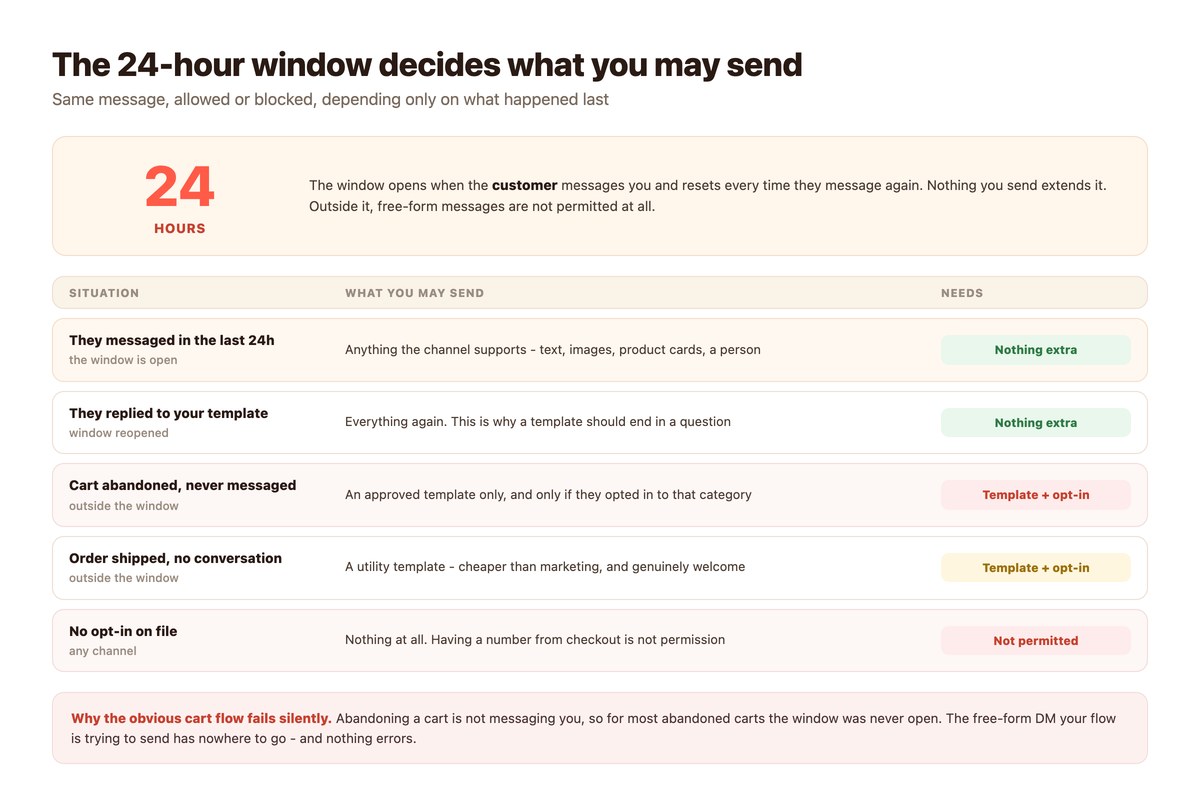
When a customer messages your business, a 24-hour window opens. Inside it you can reply freely – text, images, product cards, whatever the channel supports. The window resets every time they write again.
Outside it, free-form messages are not permitted. You may only send a pre-approved template. This single rule is why ‘just set up an abandoned cart DM’ is bad advice when it is stated that simply.
It is their clock, not yours
Nothing you send extends the window. Only a message from the customer does, which is a good argument for flows that ask a question.
Templates are a separate system
Marketing, utility and authentication templates can be sent any time, but each is submitted for approval and priced differently.
What Meta Actually Charges
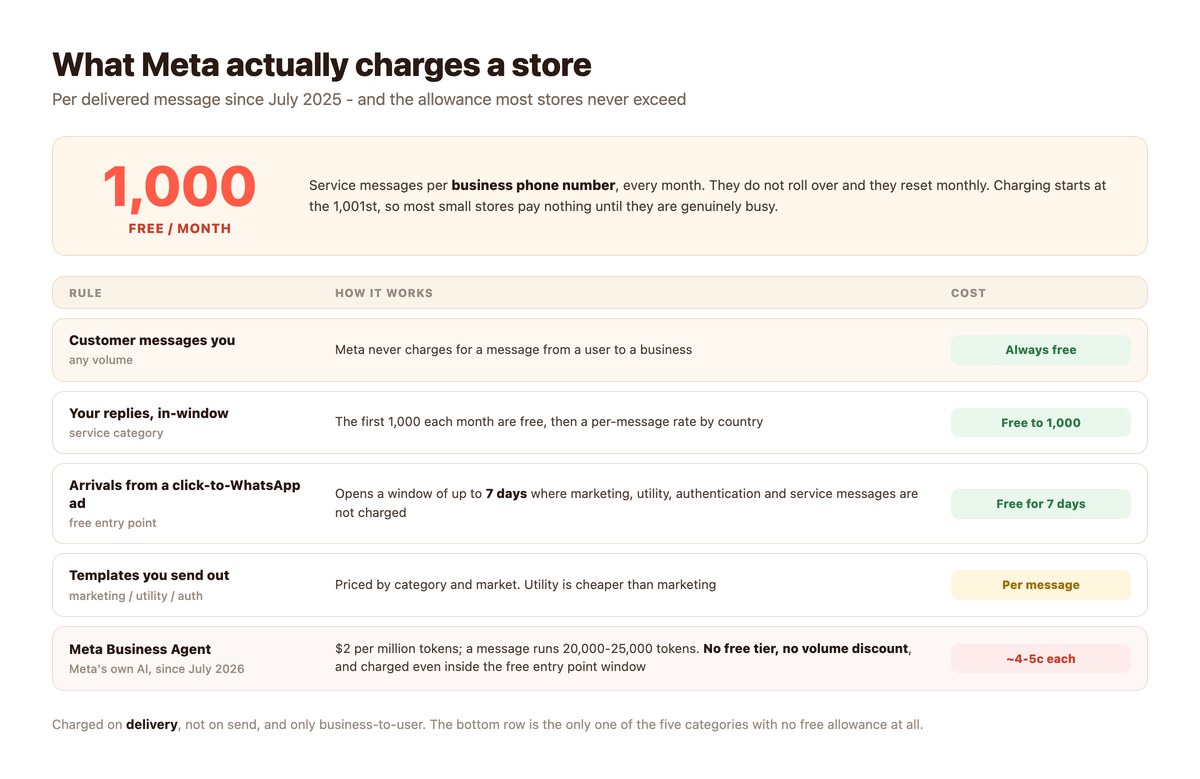
Meta publishes its rates, and they changed shape in July 2025: billing is per message rather than per conversation, by category and by the customer’s country, charged only when a message is delivered and only from you to them. Messages customers send you cost nothing.
The number that matters for a small store: every business phone number gets 1,000 free service messages a month. They do not roll over, they reset monthly, and charging starts at the 1,001st. For a shop answering a few dozen people a day that is the whole month.
Ads buy you a discount
A customer arriving through a click-to-WhatsApp ad opens a free entry point window of up to seven days, where marketing, utility, authentication and service messages are not charged.
Meta’s own AI agent is priced apart
Meta Business Agent became a fifth billing category in July 2026 at $2 per million tokens – roughly four to five cents a message – with no free tier and no volume discount, and it is charged even inside that free window.
Nobody Can Message First
No official connection on any channel lets you start a conversation with someone who has not written to you, outside an approved template with opt-in. Tools advertising unsolicited DMs at volume are using unofficial clients, and the account that gets banned is yours.
Outbound is a genuinely different product with a different method. For Instagram that is the DMpro Chrome extension, which sends from your own account at human pace; for business-to-business it is contactID, which uses contact forms.
The Flows Worth Building
In rough order of payback. The first two cover most of the volume in most stores.
Order Status
The highest-volume question in e-commerce and the most satisfying to automate, because the answer exists in a system you already have. The customer sends an order number, a webhook looks it up mid-conversation, and the reply carries a real delivery date instead of a promise to check.
Done properly this removes a whole category of message from the human queue rather than just delaying it. Order status automation covers the build.
Product Questions and Recommendations
Connecting your store puts live products inside the message. DMpro connects Shopify, WooCommerce, Etsy, BigCommerce, Magento, Squarespace, Wix, Gumroad, Printful and Spring, and once connected the products appear in the campaign builder as a catalogue you pick from.
That is the difference between sending someone a link and sending them the product. On Instagram, Messenger and WhatsApp the card renders natively in the chat.
The Cart Flow, Done Legally
Here is the honest version. If the customer is messaging you now, you are inside the window and can send whatever helps. If they abandoned a cart two hours ago and have not written, you are outside it, and the only compliant route is an approved utility or marketing template with opt-in on file.
That is not a reason to skip it – templates work – but it is a reason not to build it as a free-form DM and wonder why it silently fails. Abandoned cart DMs goes through it.
Returns and Post-Purchase
The messages after the sale decide whether there is another one. A returns flow that gives a straight answer at eleven at night costs nothing inside the free allowance and prevents the review you did not want. See returns automation and post-purchase flows.
What Each Channel Gives a Store
Capabilities differ per channel, and the differences change which flow goes where.
| Channel | Product cards | AI replies | Best for |
|---|---|---|---|
| Yes, from your catalogue | No – keyword flows only | Order status, support, repeat buyers | |
| Yes | Yes | Discovery, comment-to-DM, launches | |
| Messenger | Yes | Yes | Support, two-way automatic translation |
| TikTok | No | Yes | Comment replies on a video that is moving |
| Telegram | Via menus | Yes | Communities, course and digital sellers |
If you sell on more than two of these, the question stops being which channel and becomes how to answer them in one place – the unified social inbox covers that.
Setting Up Your First Flow
An afternoon, in this order. Step one is the one people skip and regret.
- Read a month of your own inbox. Count the questions. In most stores six of them are the majority, and that list is your build spec. Guessing produces flows nobody triggers.
- Connect the store before the channel. Shopify, WooCommerce or whichever you run. Products then appear in the builder, so your messages can carry real items instead of links.
- Start with order status. Highest volume, clearest answer, and the webhook lookup proves the whole idea to whoever is sceptical.
- Write the replies in the customer’s words. Use the phrasing from the inbox you just read, including the misspellings people actually type.
- Send everything unmatched to a person. A flow with no exit is worse than no flow. This also shows you what to automate next.
- Only then look at templates. Once the inside-the-window flows work, approved templates let you reach people outside it. Not before.
- Measure revenue, not replies. A flow that fires 400 times and sells nothing is a keyword problem.
Running It With DMpro
What the product actually does for a store, including where it stops.
Stores and Catalogues
DMpro connects your store so products are selectable in the campaign builder. You can also upload a custom catalogue as a spreadsheet – it needs a link column and takes up to 10,000 rows – or paste a single destination URL on a step.
Product links can be wrapped as tracking links, so a click is logged before the customer is redirected and the count shows up in campaign analytics. That is how you find out which of the six answers actually sells.
What It Will Not Do
Message anyone who has not contacted you first. Run AI replies on the WhatsApp channel – the block exists for other channels and is not wired for that one, so WhatsApp flows are keyword-driven. Or exempt you from the 24-hour window, which is Meta’s rule and not ours.
Keyword flows on WhatsApp are the cheap tier rather than the poor one: they run inside the free thousand and never invent an answer.
When a Person Is Needed
Refunds, complaints and anything with a number attached should reach a human, and the handoff should carry the conversation with it so nobody is asked to repeat themselves. AI to human handoff covers how that is built.
Where an E-commerce Setup Goes Next
Once the store flows are running, the pressure moves somewhere predictable.
From Flows to an Inbox
A store running six flows across three channels is no longer managing automations – it is managing an inbox. Conversations need owning, escalations need routing, and two people answering the same customer becomes a weekly occurrence rather than a story.
That shift is the subject of the unified social inbox, and the first sign you have reached it is escalations sitting overnight because nobody was named as responsible.
Support Becomes the Bigger Half
Most stores discover that the majority of DM volume is not pre-sales at all. It is order status, delivery, returns and problems – support work arriving through a marketing channel.
Which means the standards that matter are support standards: time to first useful reply, resolution rather than deflection, and a handoff that carries the conversation. Customer support automation covers that side properly, and AI to human handoff covers the moment it stops being a flow’s job.
Then the Market Question
Selling internationally turns a solved inbox back into an unsolved one, because a keyword set written in one language answers nothing typed in another – and it fails silently, so a whole market can look cold when it is only unmatched. Multilingual customer support is the fix, and it is clerical rather than technical.
The Rest of This Guide
Ten pages that go deeper on each piece. Start wherever your inbox hurts.
- Shopify DM automation — connecting the store and sending real products
- Abandoned cart DMs — the template rules, done properly
- Order status automation — the webhook lookup, start to finish
- Product recommendation chatbot — branching questions that end in a catalogue card
- Returns and exchanges automation — where e-commerce meets support
- DM automation for dropshipping — what changes when you do not hold the stock
- Post-purchase DM flows — the messages that earn the second order
- Black Friday DM marketing — planning for the week the volume triples
- Recovering lost sales with DMs — the outcome view across every flow
- E-commerce chatbot examples — real flows you can copy
Your Best Salesperson Is Asleep at 11pm
The question that arrives at eleven at night is usually the last one between a customer and a purchase. Answered at nine the next morning, it is a customer who bought somewhere else.
DMpro answers it as it lands – with the real order status, the actual product from your store, and a person brought in the moment the conversation needs one.
Conclusion
E-commerce DM automation is not complicated, but it is specific. The 24-hour window decides what you are allowed to send, Meta’s per-message pricing decides what it costs, and the free thousand service messages a month means most stores pay nothing until they are genuinely busy.
Within those rules the order of work is nearly always the same: read a month of your own inbox, connect the store, automate order status first, and route everything you did not predict to a person.
What to avoid is the flow that sounds best in a pitch – the unprompted cart message to someone who never wrote to you. That one is either a template with opt-in, or it is a banned number.
Frequently asked questions
What is e-commerce DM automation?
Automatically answering the messages customers send your store on Instagram, WhatsApp, Messenger and similar channels – order status, product questions, returns – using keyword flows or AI, with a handoff to a person for anything unusual.
Can I send an abandoned cart message on WhatsApp?
Only as an approved template, and only with opt-in. A cart abandoned hours ago puts you outside the 24-hour customer service window, where free-form messages are not permitted.
How much does it cost?
Meta charges per delivered message, by category and country, and only for messages you send. Every business phone number gets 1,000 free service messages a month, so most small stores pay nothing until they are busy. Messages customers send you are always free.
Can DMs show my actual products?
Yes. Connecting Shopify, WooCommerce, Etsy and others puts live products in the campaign builder, and the card renders natively in the chat on Instagram, Messenger and WhatsApp rather than as a link.
Can automation message people who have not contacted me?
No. Every official connection waits for the customer to write first. Reaching people outside that needs an approved template with opt-in, and anything advertising unsolicited bulk DMs is using an unofficial client that gets numbers banned.
Do I need AI, or are keywords enough?
For most stores keywords cover the six repeated questions and cost nothing inside the free allowance. AI earns its cost when the catalogue is wide or the phrasing is unpredictable. Note that AI replies are not available on the WhatsApp channel.
What should I automate first?
Order status. It is the highest-volume question, the answer already exists in your system, and a webhook can fetch it mid-conversation so the customer gets a real date rather than a promise to check.