
The LinkedIn automation market is unusual in being completely open about what it does. Vendor pages advertise human-like delays, safe daily limits, warm-up periods and dedicated IP addresses as features, on the front page, in plain sight.
Read those features literally and they describe one thing: making automated activity difficult to distinguish from a person. That is a sensible engineering goal if the activity were permitted, and it would be unnecessary if it were.
This page is about the tools rather than the terms – how they are built, what their claims mean, what enforcement costs, and what to do if your team is already running one. The rules themselves are in LinkedIn automation rules.
Key takeaways
- Architecture tells you who carries the risk. Extensions and cloud sessions act as you; an official API acts as your page.
- Human-like delays, warm-up and dedicated IPs all describe avoiding detection – a permitted tool needs none of them.
- A cloud tool holding your session is also a credential exposure, separate from the platform question.
- The account at risk is usually an employee’s personal one, carrying their network and their history.
- Enforcement is typically quiet first: reduced invitation capacity with no stated reason.
- If you are already running one, stop first and keep the data you are entitled to – then rebuild the pipeline on permitted channels.
- Check “official partner” claims against the platform’s own directory, not the badge on the vendor’s site.
How These Tools Are Built
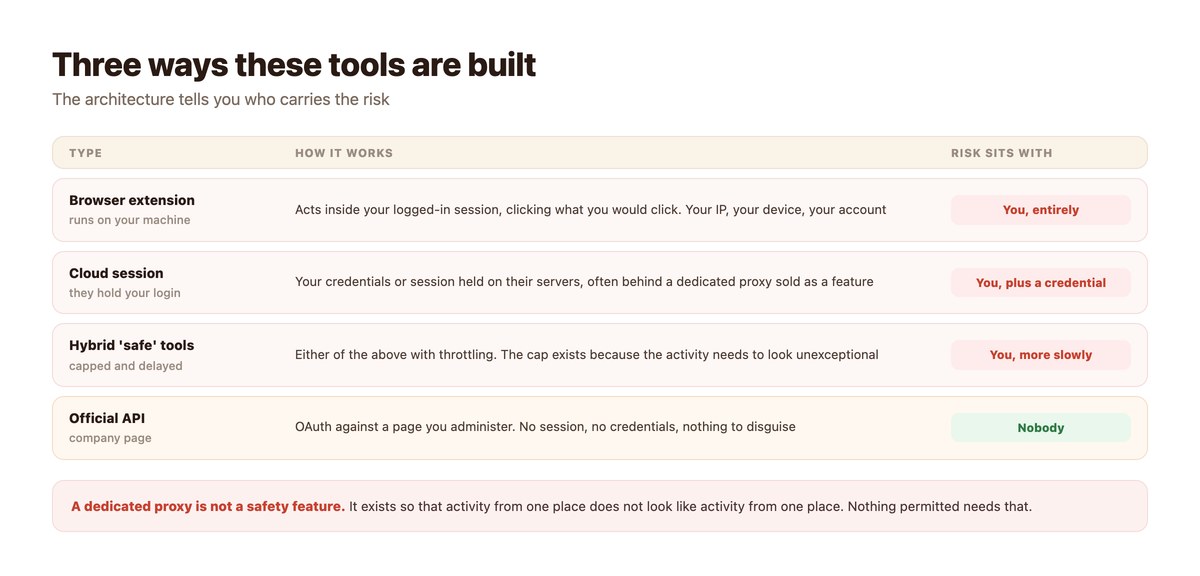
Three architectures, and the differences matter more than the feature lists.
Browser Extensions
The most common design. An extension runs in your browser and performs the actions you would perform – opening profiles, sending invitations, typing messages – inside your authenticated session.
From the platform’s perspective this is your account doing these things, because in every technical sense it is. There is no separation between the tool’s behaviour and your account’s behaviour, which is the entire point of the design and the entire problem with it.
Cloud Sessions
The tool holds your credentials or a session token on its own infrastructure and acts on your behalf without your machine involved. Usually sold as more convenient, and usually accompanied by a dedicated proxy so the traffic appears to come from a consistent location.
This adds a second, separate risk that has nothing to do with LinkedIn’s rules: a third party is holding a live session for an account that may also be your single sign-on identity elsewhere. Evaluate that on its own terms.
Official API Integrations
OAuth against a company page you administer, scoped to what the API permits. No credentials shared, no session driven, no traffic to disguise.
The surface is much smaller – publishing and comment management – and it is the only architecture that does not place your account at risk. What it can do is in LinkedIn automation.
Reading the Claims Literally
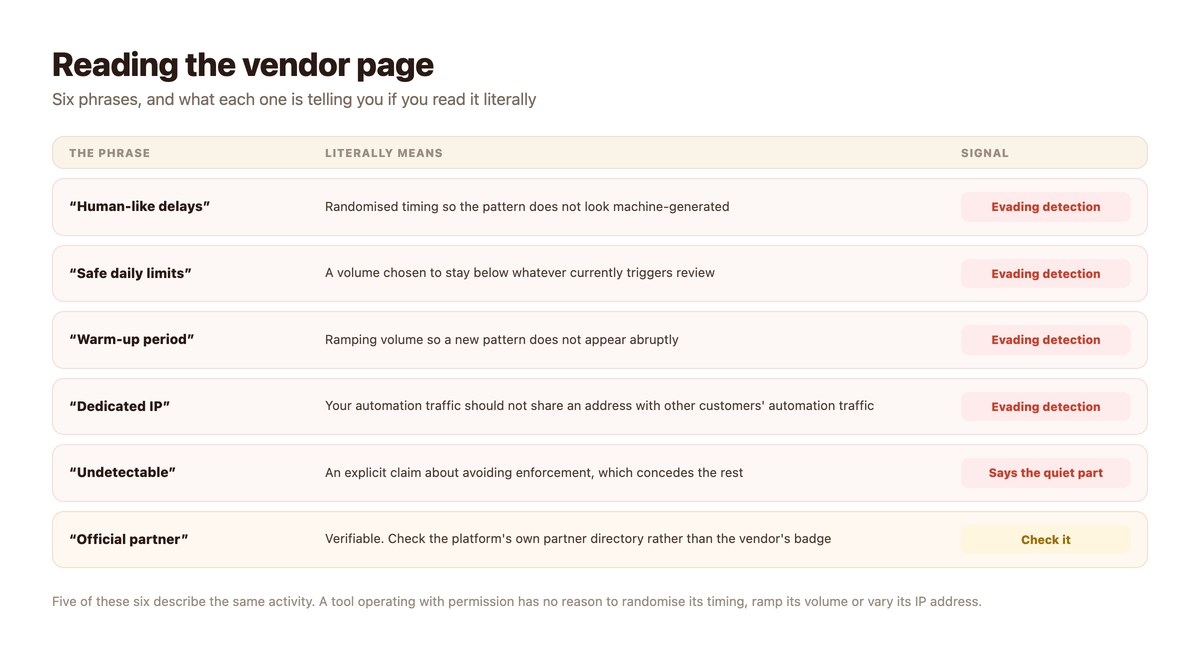
Every one of these is honest. It just does not mean what it is meant to imply.
“Human-Like Delays”
Randomised intervals between actions so the timing pattern does not look generated. This is a real engineering effort and it exists solely because a regular pattern would be identifiable.
Ask why identifiability would be a problem for permitted activity. There is no answer that does not concede the point.
“Warm-Up Period”
Starting at low volume and increasing over weeks, so that a new account does not abruptly begin behaving differently. It is modelled on the same practice in cold email, where the goal is also deliverability rather than permission.
A tool that needs to introduce itself gradually is managing how it appears, not what it is allowed to do.
“Undetectable”
Occasionally stated outright, and when it is, the marketing has answered the compliance question on your behalf. There is nothing to detect about an authorised integration.
This phrase is worth treating as disqualifying rather than reassuring.
“Official Partner”
The one claim worth checking rather than dismissing, because partner programmes genuinely exist. Verify it in the platform’s own directory, not by the badge on the vendor’s homepage.
A real partner’s capabilities will match the published API, which is a useful cross-check: if the feature list exceeds what the API offers, something else is happening underneath.
What It Costs When It Goes Wrong
Mostly not a ban, and mostly not immediate.
The Quiet Phase
Reduced ability to invite, lower visibility, no notification and no stated reason. Teams generally read this as a slow quarter rather than as enforcement, and often respond by increasing volume – which is the worst available move.
If outreach performance falls while an automation tool is running and nothing else changed, consider the tool before the market.
The Pipeline Assumption
The larger commercial risk is not the account, it is the forecast. A pipeline built on automated outreach is a pipeline that depends on continued non-enforcement, and that dependency is rarely written down anywhere a manager would see it.
When it stops, it stops at once and there is no gradual substitute ready.
Whose Account It Is
Worth stating directly: member-level automation risks a person’s own account, their network and their professional history. The company gets the pipeline; the employee carries the exposure.
That trade should be made explicitly by the person affected, not implied by handing them a tool during onboarding.
If You Are Already Running One
An exit plan, in order. None of these steps is dramatic.
| Step | Do | Why now |
|---|---|---|
| Stop the sequences | Pause outbound automation today | Continuing while you plan is the risk, not the planning |
| Export what is yours | Your message copy, your notes, your own CRM records | Access ends with the subscription |
| Leave scraped data where it is | Do not migrate harvested profile data | The provenance problem moves with the data |
| Tell the team what changed | Including why | Otherwise someone reinstalls it quietly |
| Rebuild on permitted channels | Company page comments, contact forms, email | Slower to start and it does not stop |
| Re-forecast honestly | Volume will drop before it recovers | Better to say it now than to be asked later |
What to replace the volume with is the subject of LinkedIn outreach alternatives.
Evaluating a Tool in Ten Minutes
Before a demo, not after.
- Find out what it connects to. A company page via OAuth, or your personal account? This answers most of it.
- Search the page for ‘limit’, ‘delay’, ‘warm’ and ‘detect’. What comes back tells you what the product is managing.
- Compare the feature list to the official API. Features beyond what the API offers are happening some other way.
- Check any partner claim in the platform’s own directory. Not the badge on the vendor’s site.
- Ask whose account is restricted if enforcement happens. Then ask whether that person has agreed.
- Ask what happens to your data when you leave. Especially anything that was harvested rather than given.
Where DMpro Sits
The fourth architecture, with the smaller surface that comes with it.
OAuth Against a Page You Administer
DMpro connects a LinkedIn Company Page through the Community Management API. No credentials are shared, no browser session is driven, and there is no daily cap to observe because nothing needs to go unnoticed.
The trade is a smaller feature set: comment triggers, public replies, tracked links and webhooks. That is the permitted surface in full.
And the Thing It Does Not Do
DMpro does not send LinkedIn DMs. The connection is comment-trigger only, DM sending is switched off in configuration, and LinkedIn is the one platform shipped disabled by default.
For outreach that genuinely needs to reach new companies, contactID uses published contact forms, which are a channel organisations maintain specifically so that people who do not know them can get in touch.
No Delays to Randomise
If a tool needs human-like timing, a warm-up period and a dedicated IP address, it is telling you exactly what it is doing – and asking an employee’s personal account to carry the consequence.
DMpro connects your LinkedIn company page through LinkedIn’s own API. Comment triggers, public replies, tracked links. Nothing to throttle and nothing to disguise.
Conclusion
Judge these tools by architecture rather than by feature list. An extension or a cloud session acts as you and places your account in the path of enforcement; an official API integration acts as your page and does not.
The marketing is honest if you read it literally. Human-like delays, warm-up periods and dedicated IPs are all solving the same problem, and it is not a problem that permitted software has.
If you are already running one, stop before you plan, export only what is genuinely yours, and rebuild on channels that permit what you are doing. The replacement is slower to start and it does not get switched off by someone else’s enforcement decision.
Frequently asked questions
Are LinkedIn automation tools safe to use?
Tools that act through your logged-in account place that account at risk, whatever their settings. The features advertised as safety measures – human-like delays, warm-up periods, dedicated IPs – describe avoiding detection rather than having permission.
What does a ‘warm-up period’ do?
It ramps activity volume gradually so a new pattern does not appear abruptly. It manages how the automation looks, not what it is allowed to do.
Is a browser extension safer than a cloud tool?
Neither is safe from the platform’s perspective – both act as your account. A cloud tool adds a separate issue: a third party holding a live session for an account that may also be your identity elsewhere.
What happens to my account if I am caught?
Typically reduced invitation capacity with no explanation first, then a warning, then feature or account restriction. Appeals exist and are not reliable.
How do I check an ‘official partner’ claim?
Look the vendor up in the platform’s own partner directory rather than trusting a badge on their site, and compare their feature list against the published API.
I already use one – what should I do?
Pause the sequences today, export your own copy and records, leave scraped data behind, tell the team why, and rebuild on permitted channels. Expect volume to drop before it recovers.