
Integration conversations go wrong in a predictable way. Somebody asks whether the inbox “integrates with our CRM”, everyone says yes, and six weeks later it turns out they meant three different things by it.
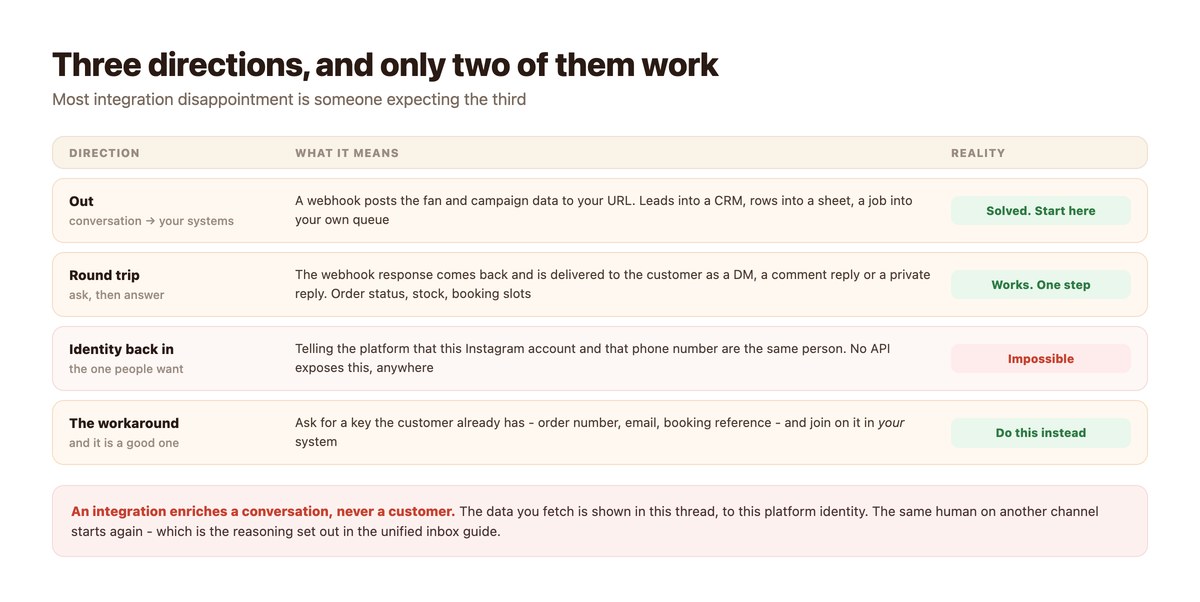
It is clearer to think in directions. Pushing data out of a conversation is solved and takes an afternoon. Round-tripping – asking your own systems something and telling the customer the answer – works and is a single step. Writing identity back in, so that a person is recognised across channels, is not possible in any tool, because no platform exposes it.
Below is each direction, what is native versus what needs a webhook, and the join-key habit that substitutes for the direction that does not exist. Why identity in particular cannot merge is set out in the unified social inbox.
Key takeaways
- Out is easy: a webhook posts conversation data to your URL, for a CRM, a sheet or your own queue.
- Round trips work: the webhook response is delivered back to the customer as a DM, comment reply or private reply.
- Identity cannot be written back. No platform exposes a shared identity, so no integration can merge a customer across channels.
- The substitute is a join key the customer already has – order number, email, booking reference – matched in your own system.
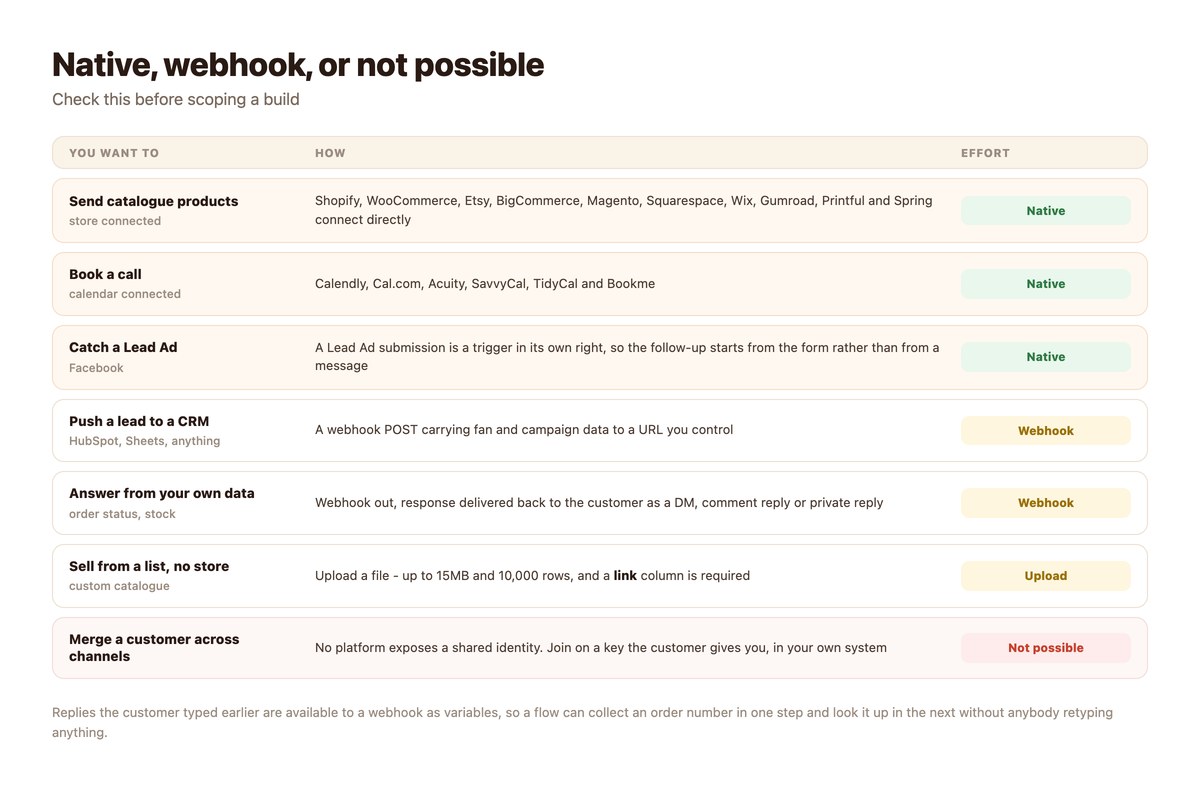
- Stores and calendars connect natively; Facebook Lead Ad submissions are a trigger in their own right.
- A custom catalogue can be uploaded instead of connecting a store – up to 15MB and 10,000 rows, with a
linkcolumn required. - Answers the customer typed earlier are available to a later webhook, so nothing has to be retyped.
Direction One: Out
The easy one, and the one worth doing first.
A Webhook Is Usually the Whole Integration
A webhook step posts the conversation’s data – who the fan is, which campaign, what they answered – to a URL you control. From there it is your system’s problem, which is exactly where you want it.
That single mechanism covers most of what people mean by integration: pushing leads into HubSpot, appending rows to a sheet, kicking off fulfilment, notifying an internal tool.
Send the Answers, Not Just the Contact
Replies collected earlier in a flow are available to later steps as variables, so the webhook can carry the actual content of the conversation rather than just an identifier.
Design the flow so the questions you need answered are asked before the webhook fires. It is obvious in hindsight and routinely got wrong.
Decide What You Are Allowed to Keep
Pushing conversation data into your own systems makes you responsible for it in a way the platform previously was. Keep what you need for the job and set a retention period before you start, not after an audit.
The record-keeping side of this is covered in CRM for social DMs.
Direction Two: The Round Trip
The one that makes automation feel like service rather than like a menu.
Ask Your Systems, Tell the Customer
A webhook can return a response, and that response can be delivered straight to the customer – as a DM, as a public comment reply, or as a private reply to a comment. Which means the automation answers from live data instead of restating policy.
“Where is my order?” answered with an actual delivery date is a different product from “orders usually arrive in 3-5 days”, and the mechanism is the same one either way – the pattern is worked through in the order-status lookup.
What It Is Good For
Order status, stock levels, booking availability, account state, warranty checks, balance enquiries. Anything where your system knows a fact the customer is asking for and the lookup needs one key.
If a question needs two keys or a judgement, it is a handoff rather than a lookup, and should be treated as one.
Choose the Delivery Surface Deliberately
Returning the answer as a public comment reply is right for “do you ship to Canada?” and wrong for “where is my order?”. The private reply surface exists precisely for the second case and carries a longer window than the inbox does.
Pick per flow rather than per tool.
Direction Three: The One That Does Not Exist
And the workaround, which is genuinely good enough.
You Cannot Tell a Platform Who Someone Is
There is no API anywhere that lets you say: this Instagram account and this phone number belong to the same customer. The platforms do not expose it to each other and they do not expose it to you.
So no integration produces a unified customer. An integration enriches this conversation, with this platform identity, and the same human arriving on another channel starts from nothing.
Ask for the Key
The workaround is to ask for something the customer already has and that your systems already know: an order number, an email address, a booking reference. With that, you join the records yourself and the conversation can be as informed as you like.
This is why experienced flows ask for the order number early. It is the lookup key and the join key, and getting it in the first two messages changes what everything downstream can do.
Say What You Cannot Do
Do not promise customers that you will remember a conversation they had somewhere else. You will not, reliably, and the promise is noticed when it fails rather than when it is made.
Integration Shopping List
Work down it. Each row is independent of the ones below.
| Goal | Mechanism | Typical effort |
|---|---|---|
| Send products in a DM | Connect the store | Minutes |
| Book a call from a DM | Connect the calendar | Minutes |
| Follow up a Lead Ad | Lead Ad trigger | Minutes |
| Sell without a store | Custom catalogue upload (link column required) | An hour |
| Lead into CRM | Webhook out | An afternoon |
| Answer from live data | Webhook round trip | A day, mostly on your side |
| Recognise a customer across channels | Join key you ask for | Design, not build |
Costs attach to some of this at volume, and they are per channel – the numbers are in DM automation pricing compared.
Building the First One
Start with the round trip that answers your most repeated question.
- Pick the question you answer most. Usually order status, availability, or opening hours. Count rather than guess.
- Decide the one key the lookup needs. If it needs two, or needs judgement, this is a handoff rather than a lookup.
- Ask for that key early in the flow. Collected replies are available to the webhook later, so ask once.
- Stand up an endpoint that takes the key and returns one sentence. One sentence. The temptation to return a paragraph makes the reply unreadable.
- Choose the delivery surface. Private reply for anything order-specific; public comment only for general facts.
- Handle the not-found case explicitly. ‘I cannot find that number – a human will check’ is a correct answer. Guessing is not.
Doing It With DMpro
The native list and the general-purpose escape hatch.
Native Connections
DMpro connects Shopify, WooCommerce, Etsy, BigCommerce, Magento, Squarespace, Wix, Gumroad, Printful and Spring for catalogue sends, and Calendly, Cal.com, Acuity, SavvyCal, TidyCal and Bookme for booking. A Facebook Lead Ad submission is a trigger in its own right.
If you have no store to connect, a custom catalogue can be uploaded instead – up to 15MB and 10,000 rows, with a link column required.
The Webhook Step
Everything else goes through Call webhook: an HTTP POST carrying fan and campaign data to your URL, with the option of delivering the response back to the customer as a DM, a comment reply or a private reply.
That one step is what turns a flow from a menu into something that answers from your real data.
And the Limit, Once More
No integration merges a customer across channels, because no platform exposes the identity to merge. Ask for a key, join in your own system, and design the conversation so the key arrives early.
Answer From Real Data
“Orders usually arrive in 3-5 days” is a policy. “Yours is out for delivery today” is service, and the difference is one webhook and one key asked for at the right moment.
DMpro connects your store and calendar natively, catches Lead Ad submissions as a trigger, and posts to any endpoint you control – returning the answer straight to the customer.
Conclusion
Think in directions. Out is an afternoon’s work and covers most of what people mean by integration. The round trip – ask your systems, tell the customer – is a single step and is what makes an automation feel like service.
The third direction does not exist. Nothing writes identity back into a platform, so no integration gives you one customer across channels. Ask for a key the customer already has, join on it yourself, and get that key into the first two messages.
And when the lookup fails, say so. “I cannot find that number, a human will check” is a correct answer, and it is the one that keeps the integration trustworthy on the day your endpoint is down.
Frequently asked questions
What can a social inbox integrate with?
Stores like Shopify, WooCommerce and Etsy and calendars like Calendly and Cal.com connect natively, Facebook Lead Ad submissions act as a trigger, and anything else goes through a webhook that posts conversation data to a URL you control.
Can an automation answer using my own data?
Yes. A webhook can send the customer’s details to your system and deliver the response straight back to them as a DM, a comment reply or a private reply – which is how order status and stock lookups work.
Can integrations merge a customer across channels?
No. No platform exposes an identity that crosses channels, so nothing can write that link back. Ask the customer for an order number or email and join the records in your own system instead.
Do I need a store to send products?
No. A custom catalogue can be uploaded instead – up to 15MB and 10,000 rows, with a link column required for each item.
Can a webhook use what the customer typed earlier?
Yes. Replies collected earlier in a flow are available to later steps as variables, so an order number asked for in one message can be looked up in the next without anybody retyping it.
What should happen if the lookup fails?
Say so and hand over. ‘I cannot find that number – a human will check’ is a correct answer; guessing or restating generic policy is what makes customers stop trusting the automation.