
Managing several social accounts gets written about as though it were the same problem as managing several channels. It is not, and treating them as one is why so many setups end up with both problems at once.
Several channels is a question of attention – how many promises you can keep. Several accounts is a question of structure: who is authorised, where a message should land, whose voice an answer is written in, and which human replied. None of those are solved by connecting more things.
There are three distinct shapes here – multi-brand, multi-location and agency – and one product constraint that catches every agency eventually. The channel-count question is answered separately in omnichannel messaging strategy.
Key takeaways
- Multi-account is a structure problem, not a channel problem. Adding channels to a broken routing setup doubles the mess.
- Multi-brand fails on voice and policy drift; multi-location fails on routing; agencies fail on access.
- Catalogue and post actions must run on the account that owns them – invited participant accounts cannot send products or an Instagram post.
- Each social account is authorised separately, and one lapsed connection silently stops that account’s automations.
- The same customer across two of your brand accounts is two conversations – identity does not merge.
- Clients should always own their own connections. An agency holding a personal login is a single point of failure with a resignation attached.
- Knowing which human replied is a convention you impose, not something the workspace records for you.
Three Shapes
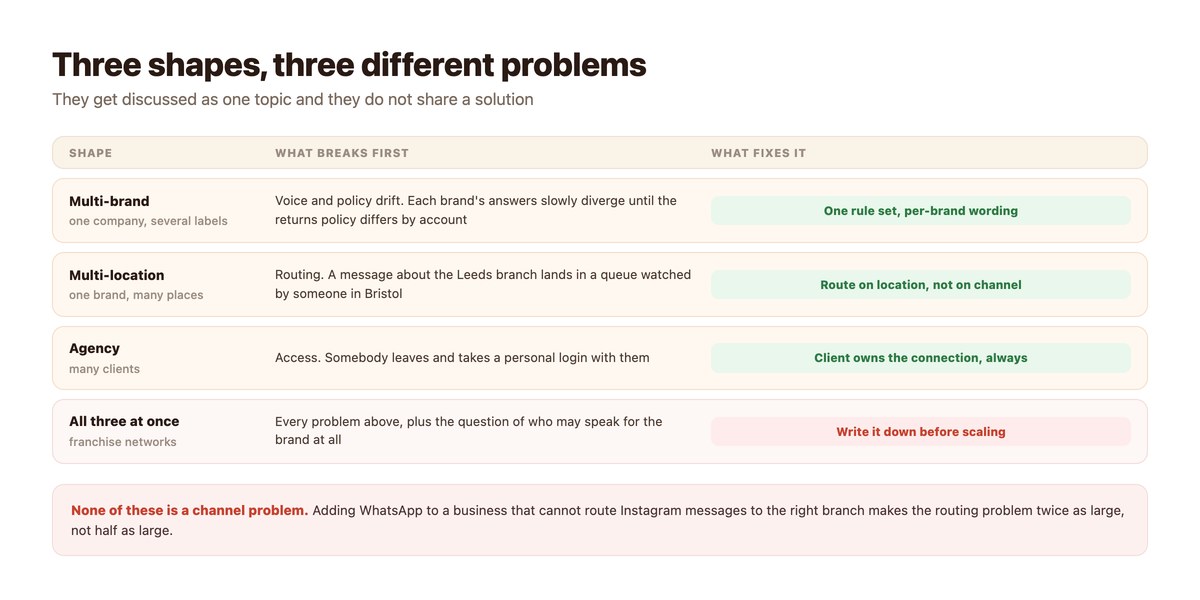
Identify yours before choosing anything, because the fixes do not transfer.
Multi-Brand — Drift
One company, several labels, each with its own account and often its own tone. What fails is consistency: six months in, the returns window quoted by one brand no longer matches the other, because somebody updated one answer and not the other.
The fix is one rule set with per-brand wording – the policy is decided once centrally and the voice varies at the surface. If the policies themselves differ by brand, write down why, because a customer who buys from both will notice.
Multi-Location — Routing
One brand, many branches. The failure is geographic: a question about one location arrives in a queue watched by someone who cannot answer it, gets forwarded informally, and takes a day.
Route on location rather than on channel. Ask for the branch or postcode early – it is the same join-key habit that makes order lookups work, described in looking up an order mid-conversation – and send the thread to the people who can actually answer.
Agency — Access
Many clients, one team. The failure is access: connections made through one employee’s personal profile, which leave when that person does, and a client relationship that becomes awkward to unwind because nobody can say who owns what.
The rule worth adopting on day one is that the client owns the connection and the agency is invited to it. It is slightly more work to set up and it removes an entire category of dispute.
Where the Line Sits
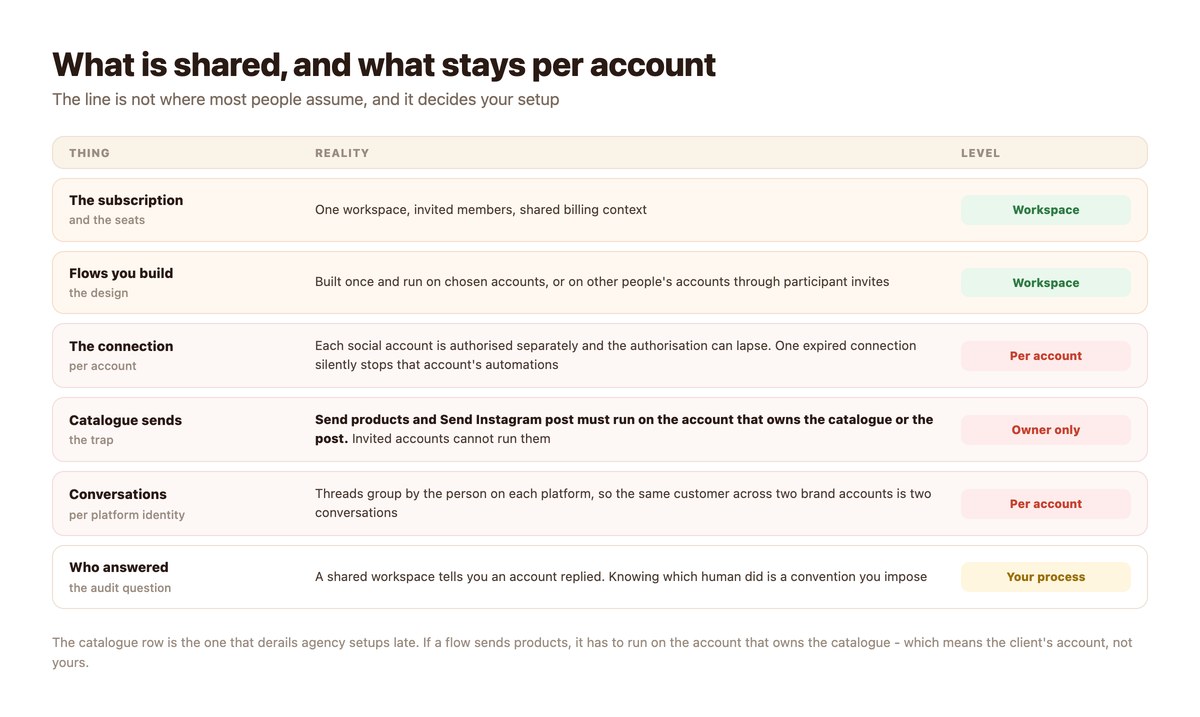
What a shared workspace actually shares, and what stubbornly stays per account.
Shared: Billing, Seats and the Flows You Design
A workspace holds the subscription, the invited members and the automations you build. A flow is designed once and run on whichever accounts you choose, which is what makes multi-account setups worth having at all.
That is a real saving: the work of designing a good flow is most of the work, and it is done once rather than per brand.
Not Shared: The Connections
Every social account is authorised individually, and authorisations lapse. The failure mode is quiet – automations on that one account simply stop, no error reaches a customer, and nobody notices until somebody checks.
Put a recurring check in the calendar. On a multi-account setup this is the single most common cause of “it stopped working”.
Not Shared: Catalogue and Post Actions
The one that derails agency setups late, usually after a flow has been built and demonstrated. Send products and Send Instagram post must run on the account that owns the catalogue or the post. An invited participant account cannot run them.
So a product flow cannot be centrally operated on a client’s behalf from your own account – it has to run on theirs. Design for that from the start, because discovering it after a build means rebuilding.
Not Shared: Customer Identity
The same person messaging two of your brand accounts is two conversations with two histories, for the same reason the same person on two channels is two contacts. Nothing merges them, and no tool can – the reasoning is in the unified social inbox.
For multi-brand groups this is worth saying out loud internally, because somebody will eventually propose a single customer view and be disappointed.
Decisions to Make Before Connecting Anything
Each of these is cheap now and expensive in six months.
| Decision | Default worth taking | Cost of skipping it |
|---|---|---|
| Who owns each connection | The brand or client, always | A resignation takes your access with it |
| Where a message should land | Route on brand or location | Informal forwarding, and a day lost per message |
| Whose policy applies | One rule set, per-brand wording | Contradictory answers to the same question |
| Which account runs product flows | The one owning the catalogue | A built flow that cannot run where you planned |
| Who may speak for the brand | A named, short list | Nobody can audit what was said |
| When connections get checked | A monthly calendar item | Silent failure on one account for weeks |
Once several people are answering across those accounts, the ownership question stops being theoretical – that is assigning conversations to a team.
Setting It Up
A day, and the order matters more than the speed.
- Write down which shape you are. Multi-brand, multi-location, agency, or more than one. The fixes differ.
- Connect each account from an account the organisation owns. Never a personal profile belonging to one employee, and for agencies never yours.
- Build the flow once, then choose the accounts it runs on. Design is the expensive part and it only needs doing once.
- Check product and post flows against the owning-account rule. If a flow sends catalogue products, it must run on the account that owns the catalogue.
- Decide routing before volume arrives. Ask for brand or location early in the conversation and route on the answer.
- Put a monthly connection check in the calendar. Lapsed authorisations fail silently. This is the commonest cause of mystery breakage.
Doing It With DMpro
The parts that are supported, and the one rule to design around.
Workspaces, Seats and Participants
DMpro supports multi-seat workspaces with invites and shared billing, and a participant model where the owner of a campaign invites other DMpro users to run the same flow on their own accounts – which is how agencies and brand partnerships are meant to work.
There is also a start mode that holds a campaign pending until every invited account has accepted, so a coordinated launch does not go out half-connected.
The Owning-Account Rule
Stated once more because it is the expensive one: Send products and Send Instagram post require the account that owns the catalogue or the post. Invited accounts cannot run those actions.
Everything else – keyword triggers, conditions, delays, webhooks, AI responses where the channel supports them – runs fine on invited accounts.
One Queue Across Accounts
Conversations from every connected account arrive in the same view, grouped by the person on each platform. That gives you the single queue; the routing and ownership conventions on top of it are still yours to design.
Several Accounts, One Set of Rules
Multi-account setups rarely fail on tooling. They fail because nobody wrote down who owns a connection, where a message should land, or whose policy applies – and then somebody left.
DMpro gives you one workspace with invited seats, flows built once and run on the accounts you choose, and every account’s conversations in a single queue.
Conclusion
Several accounts is a structure problem. Decide who owns each connection, where messages should land, and whose policy applies – before volume arrives, because each of those decisions gets harder to change as conversations accumulate against the wrong structure.
Design flows once and run them where they need to run, keeping the owning-account rule in mind: anything sending catalogue products or an Instagram post has to run on the account that owns them, which for agencies means the client’s account rather than yours.
And check the connections monthly. Lapsed authorisations are the quietest failure in this whole setup – nothing breaks visibly, one account just stops answering.
Frequently asked questions
How do I manage several social accounts in one place?
Connect each account individually to a single workspace, build flows once and choose which accounts run them, and route incoming messages on brand or location. The structural decisions – who owns each connection and whose policy applies – matter more than the tooling.
Can one flow run on several accounts?
Yes, including other people’s accounts through participant invites. The exception is catalogue product sends and Instagram post sends, which must run on the account that owns the catalogue or the post.
Should an agency connect a client’s account to its own profile?
No. The client should own the connection and invite the agency. An agency holding a connection through one employee’s personal profile loses access when that person leaves, and the relationship is awkward to unwind.
Do customers merge across my brand accounts?
No. The same person messaging two of your accounts is two conversations with two histories, for the same reason the same person on two channels is two contacts. Platforms expose no identity that crosses accounts.
Why did automations stop on just one account?
Almost always a lapsed connection. Each social account is authorised separately, the authorisation can expire, and the failure is silent – put a monthly check in the calendar.
How do I route messages to the right branch?
Ask for the location or postcode early in the conversation and route on the answer. Routing on channel instead of location is the commonest multi-location mistake.