
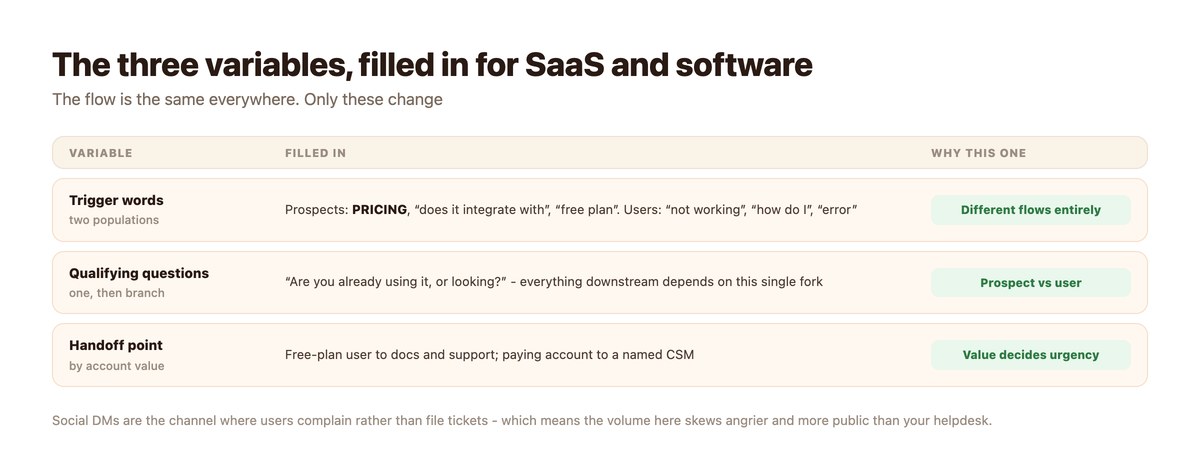
SaaS social media support covers two completely different conversations in the same inbox. People evaluating the product, and people already using it and stuck. They arrive through the same channel, they phrase things similarly, and routing them to the same flow is the main thing that goes wrong.
There is also a pattern in SaaS social media support worth knowing before you build anything: most messages that look like bug reports are onboarding failures. Which means a month of your DM inbox is a product backlog wearing support clothing.
The flow shape is standard – see DM automation by industry. Below is the single question that forks everything, and what to do with what you learn.
Key takeaways
- One qualifying question forks the whole flow: are you already using it, or looking?
- Prospects and stuck users need different people, different tone and different speed.
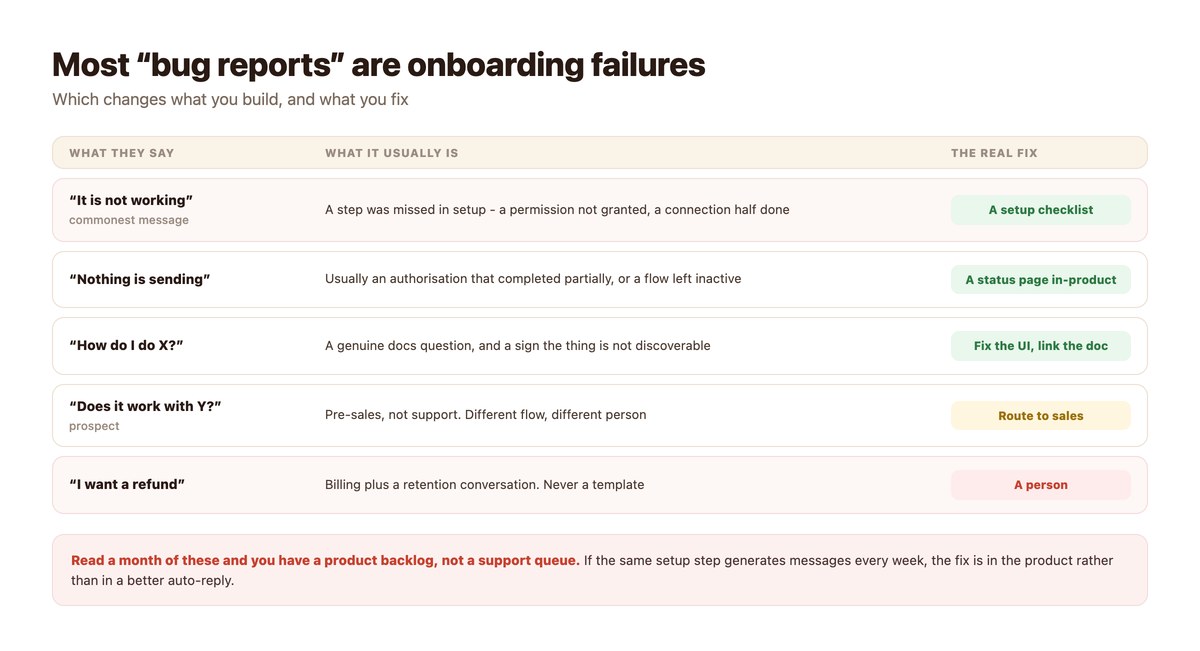
- Most “it is not working” messages are a missed setup step, not a bug.
- If the same step generates messages weekly, fix the product rather than the auto-reply.
- Route paying accounts to a named CSM; free-plan users to docs and standard support.
- Social is where users complain rather than file tickets, so the volume skews angrier and more public.
Two Populations, One Inbox
The fork that has to happen before anything else.
Ask Once, Branch Hard
“Are you already using it, or are you looking?” Two buttons, asked immediately. Everything after that – the tone, the speed, the person, the content – differs.
Flows that skip this end up sending pricing to a frustrated existing customer, which is the single most irritating thing a software company can do in a DM.
Prospects Want Specifics Fast
“Does it integrate with X” and “what does it cost” are pre-sales questions with factual answers, and answering them immediately with a real number beats routing them to a form.
If you have a free plan, say so in the first reply. The most common reason a software enquiry goes cold is that it took a day to learn something that is on the pricing page.
Users Want to Be Unstuck
Existing users messaging on social are usually past the point of looking in the docs. They want the specific thing fixed, and they are often slightly annoyed, because messaging a company on Instagram is not anyone’s first choice for technical support.
Speed matters more than depth here. A fast partial answer plus a route to someone who can finish it beats a thorough answer tomorrow.
Your Support Queue Is a Product Backlog
The most useful thing in this article, and it costs twenty minutes a month.
“It Is Not Working” Is Rarely a Bug
In most products the commonest support message resolves to a setup step that was missed, skipped or half-completed – a permission not granted, an authorisation that returned early, a flow left in draft.
That is not a support problem being reported. It is an onboarding problem being reported in the only words the user has.
Count Them by Cause, Not by Volume
Group a month of messages by what actually resolved them. If one setup step accounts for a meaningful share, no auto-reply will fix that – a status indicator in the product will.
This is the same discipline as reading escalation reasons rather than counting them, described in support metrics for DMs.
Automate the Interim, Fix the Cause
Both, in that order. Ship the auto-reply that unsticks people today, and put the product fix on the backlog with the message count attached – that number is unusually persuasive in a prioritisation meeting.
Routing by Account, Not by Topic
The useful axis in SaaS is who is asking, not what about.
| Who | Goes to | Speed |
|---|---|---|
| Prospect, general question | Automated answer + docs | Instant |
| Prospect, enterprise-shaped | A person, immediately | Minutes |
| Free-plan user, stuck | Automated answer + docs link | Instant |
| Paying account, stuck | Named CSM or support, with account context | Within the hour |
| Any account, billing or refund | A person | Same day |
| Any account, security or data | A person, immediately | Minutes |
A webhook lookup on the sender can pull plan and account age into the conversation before anyone reads it, which is what makes this routing possible – the same mechanism as an order status lookup.
Building It
A day, and the account lookup is the part that earns its keep.
- Ask the fork question first. Already using it, or looking. Two buttons, before anything else.
- Answer pricing and integrations instantly. With real numbers and a real list. This is the commonest pre-sales question and the easiest to lose.
- Add an account lookup by webhook. Plan, account age, last activity. It turns generic support into routing.
- Build the top three stuck-states as flows. From your own data, not from guesses. Usually a permission, a connection and an inactive flow.
- Route billing, refunds and anything security to a person. Hard keywords, no partial answers.
- Group a month by cause and take the top one to the product team. With the message count. That number carries more weight than any opinion.
What Not to Automate
Three, and the last one is specific to software.
Anything About Billing
Refunds, failed payments, plan disputes. Money plus a retention conversation, and the two together are never a template.
Anything About Security or Data
A question about a breach, a data request, or what you store should reach a person within minutes, both because the answer carries obligations and because the question is sometimes a report in disguise.
This belongs on the written hard-route list – support escalation rules.
Confident Technical Answers
An AI step that explains how your product behaves will eventually explain a behaviour that does not exist, confidently, to a user who then builds on it. Scope it tightly to your own documentation and have it say when it does not know.
Note the channel limit while designing this: AI replies work on Instagram, TikTok, Telegram and Discord, and not on WhatsApp or Messenger.
Unstick the User Before They Post About It
Someone messaging your company on social is already past the docs and slightly annoyed. The gap between that message and a useful reply is the gap in which they write a review instead.
DMpro forks prospects from users on the first question, pulls account context in through your own webhook, answers the common stuck-states instantly, and routes paying accounts to a named person with everything attached.
Conclusion
Two populations, one inbox, and one question that separates them. Ask whether somebody is using the product or looking at it before anything else, because every downstream decision depends on the answer.
Then treat the inbox as data. Most messages that read as bug reports are onboarding failures, and grouping a month of them by cause gives you a prioritised product backlog with volume numbers attached – which is a more persuasive artefact than anything a support report usually produces.
Automate the interim answer, fix the cause, and keep billing, security and confident technical explanations off the bot.
Frequently asked questions
What should a SaaS DM flow ask first?
Whether the person is already using the product or still looking. Everything after that – tone, speed, who handles it, what gets sent – depends on the answer, and skipping it means sending pricing to a frustrated customer.
Why do most SaaS support messages turn out not to be bugs?
Because the commonest message, ‘it is not working’, usually resolves to a missed setup step – a permission not granted or an authorisation that completed partially. That is an onboarding problem reported in the only words the user has.
How should we route by account?
Pull plan and account age in with a webhook lookup before anyone reads the message. Free-plan users get an automated answer and docs; paying accounts get a named person with the account context attached.
What should never be automated in SaaS support?
Billing and refunds, anything about security or data, and confident technical explanations. The last one matters because an AI step will eventually describe behaviour that does not exist, to a user who then builds on it.
Is social support different from a helpdesk queue?
Yes – social is where users complain rather than file tickets, so the volume skews angrier and more public. Speed matters more than depth, and a fast partial answer plus a route to someone who can finish beats a thorough reply tomorrow.
Can AI answer product questions?
Scoped tightly to your own documentation, and only on channels that support it – Instagram, Messenger, Telegram and TikTok, but not WhatsApp. It should be able to say when it does not know.