
Customer service automation mistakes do not usually announce themselves. There is no outage, no error rate, no alert. They fail by producing dashboards that look fine while customers quietly have a worse time than they did before.
That is what makes customer service automation mistakes worth writing down. Most of these are not subtle once you know them, and almost all of them are cheaper to avoid than to discover – but you will not discover them from the reporting.
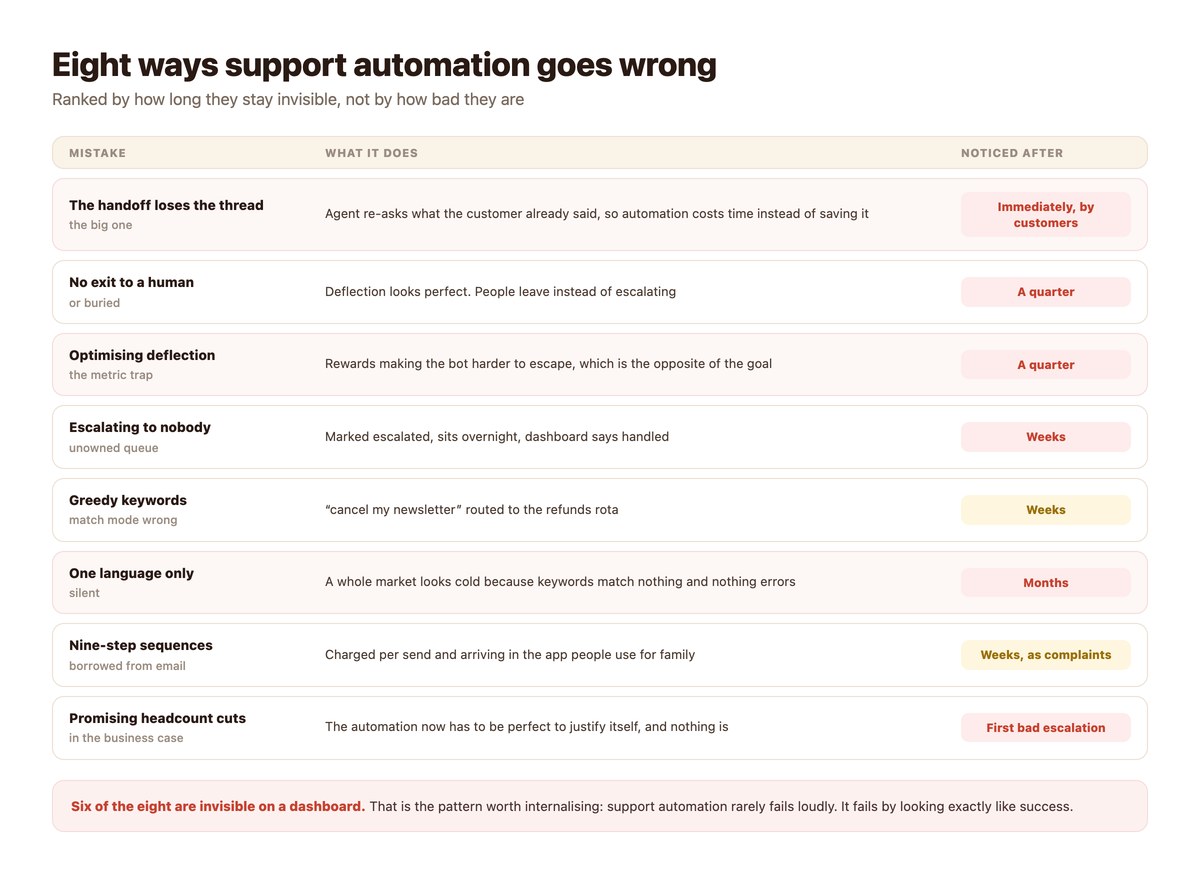
Eight failures, roughly ordered by how long they stay invisible, and the sequencing that prevents most of them. For the framework they all sit inside, see customer support automation.
Key takeaways
- Six of the eight are invisible on a dashboard. Support automation fails by looking like success.
- The handoff losing the conversation is the most expensive and the fastest to notice – customers tell you.
- No exit to a human makes every metric look better and the experience worse.
- Escalating to an unowned queue is marked as handled and sits overnight.
- A whole market can go unanswered for months because keywords match nothing and nothing errors.
- Build three flows, not eight, and read every escalation for the first month.
- Never put headcount reduction in the business case.
The Expensive One
If you fix nothing else from this page, fix this.
The Handoff That Loses the Conversation
The customer explains the problem to the automation, gets passed to a person, and is asked to explain it again. They have now done the work twice and waited, which is worse than if you had never automated anything.
This is the specific reason support automation projects get cancelled – not because the flows were bad, because the escalations were. What has to travel with a conversation is the whole of AI to human handoff.
Why It Survives
Because it looks like success internally. The flow ran, the escalation fired, the agent replied, the conversation closed. Every system involved reports a clean result.
The only way to see it is to read conversations. Twenty escalated threads, counting how often the agent asked for something already given, will tell you in ten minutes what no report will.
The Ones That Flatter Your Reporting
Three failures that actively improve the numbers while degrading the service.
Removing or Burying the Exit
Making a human harder to reach raises deflection, lowers escalation volume and improves average handling time. Every number moves the right way and customers leave instead of escalating.
If your metrics improved and nobody can name the flow that got better, check whether the exit moved.
Optimising Deflection
Setting deflection as the target makes all of the above rational. The metric cannot distinguish a question answered from a customer giving up, so optimising it rewards the second.
Use resolution rate instead; the arithmetic and the three ways deflection gets gamed are in measuring deflection.
Counting Any Reply as a Reply
An automatic acknowledgement takes reported response time to near zero and tells the customer nothing. It is the single easiest way to make a support dashboard look transformed in a week without changing anything.
Measure time to first useful reply – the distinction is in reply time benchmarks.
The Quiet Structural Ones
Three that produce no signal at all until somebody goes looking.
Escalating Into a Void
A conversation routed to “the team” belongs to nobody. It is marked escalated, the dashboard counts it as handled, and it sits until someone happens to scroll past.
The fix is a named owner per day and a timeout that re-escalates – both of which belong in a written rule set, covered in the escalation rules themselves.
Keywords That Match Too Much
A trigger set to fire when a message merely contains a word will catch things it was never meant to: a refunds rule catching “cancel my newsletter”, an urgent rule catching “no rush”.
Match on whole words by default. This is a single setting and it is the commonest cause of wrong routing.
Only Speaking One Language
The longest-hiding failure on the list. A keyword set written in one language matches nothing typed in another, no branch runs, nothing errors, and nothing is logged – so an entire market reads as uninterested rather than unanswered.
Detectable in ten minutes by comparing inbound volume by country against replies by country, as described in multilingual customer support.
The Two Self-Inflicted Ones
Both are decisions made before launch that constrain everything afterwards.
Email Sequences on a Messaging Channel
A nine-step nurture sequence is normal in email, where being ignored costs nothing. On messaging each send is charged and arrives in the same app as messages from the customer’s family, and the complaint threshold is correspondingly lower.
Complaints here do not just lose a customer – at volume they affect the standing of your number. Three messages is the shape that works.
Promising Headcount Reduction
Put it in the business case and the automation has to be perfect to justify itself, because the saving was predicated on people leaving. The first bad escalation then reads as proof it was a mistake.
Promise more volume handled on better work instead, which is what actually happens and survives a bad week – the honest version of the case is in reducing support costs with automation.
How to Catch Each One
Mostly by reading rather than by reporting, which is why they survive.
| Mistake | The check | How long it takes |
|---|---|---|
| Handoff loses the thread | Read 20 escalated threads, count re-asks | 10 minutes |
| No exit to a human | Try to reach a person as a customer | 2 minutes |
| Escalating to nobody | Ask who owns escalations today, by name | 1 minute |
| Greedy keywords | Read a month of escalations, mark should/should-not | 20 minutes |
| One language only | Inbound volume by country vs replies by country | 10 minutes |
| Shallow answers | Repeat-contact rate | A query |
Which of these belong on a permanent dashboard, and which should stay as periodic checks, is covered in which support numbers to track.
The Sequencing That Avoids Most of This
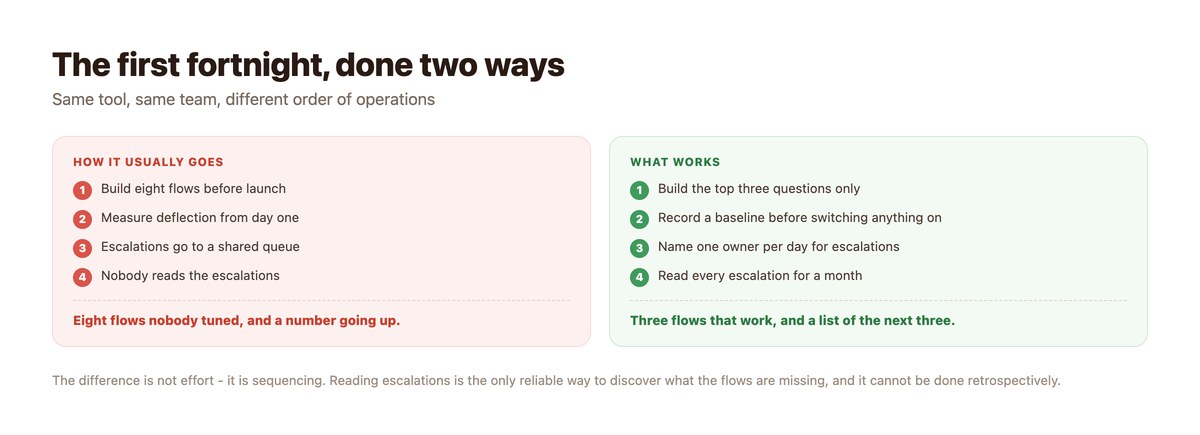
Not more effort – a different order.
- Record a baseline before switching anything on. Four weeks of volume, response times and who answered what. Skipping this makes every later claim unprovable.
- Write the escalation rules before the first flow. Including who owns them by name and what happens overnight.
- Build three flows, not eight. The top three questions, answered completely. Eight shallow flows is the commonest launch mistake.
- Test the exit to a human as a customer. From a real phone. If it is hard to find, you have already made mistake number two.
- Read every escalation for a month. Twenty minutes a week. This is the only reliable way to find what the flows are missing, and it cannot be done retrospectively.
- Fix wording before adding features. Most underperforming flows are a sentence, not a missing capability.
The Pattern Underneath
Worth naming, because it generalises beyond these eight.
Anything That Makes the Bot Harder to Escape Will Look Good
Deflection up, escalations down, handling time down, cost per conversation down. Every standard support metric rewards it, and none of them notices the customer who left.
So the single most useful habit is to treat improvements in those metrics as questions rather than results: what changed, and did the exit move?
And Anything Genuinely Good Will Look Worse First
Make the human easier to reach and deflection falls. Escalate on first uncertainty and escalation volume rises. Answer more honestly about delivery and you lose a few impatient buyers.
All three are the system working. Annotate the charts with what changed and when, or somebody will eventually optimise the improvements away.
Where This Connects
Two places these failures tend to surface first.
Overnight
Most of these are worse at night, because nobody is there to notice. The unowned escalation, the buried exit and the silent language failure all do their damage between six in the evening and nine in the morning – after-hours DM support covers the coverage models.
At the Tooling Threshold
Several of these get misdiagnosed as needing a new tool when they are ownership problems. Before migrating anything, check whether the fix is a rota – shared inbox vs helpdesk goes through the distinction.
The Failures Are Quiet. The Fixes Are Cheap.
Most support automation problems are not capability gaps. They are a handoff that loses the thread, an escalation nobody owns, and a keyword list that only speaks one language.
DMpro carries the whole conversation into the handoff, routes to named people rather than a queue, and puts every language on the same trigger – so the failures that hide for months do not get the chance to start.
Conclusion
Support automation rarely fails loudly. Six of these eight failures are invisible on a dashboard, and three of them actively improve the numbers while making the experience worse – which is why reading conversations matters more than reading reports.
The checks that catch the whole list take under an hour in total, and most teams have never run any of them. Read twenty escalated threads, try to reach a human as a customer, ask who owns escalations today by name, and compare inbound volume by country against replies by country.
Then fix the sequencing rather than the tooling: baseline first, rules before flows, three flows not eight, and every escalation read for a month. That order prevents most of this page.
Frequently asked questions
What is the most common support automation mistake?
A handoff that loses the conversation. The customer explains the problem, gets passed to a person, and is asked to explain it again – which is worse than not automating at all, and it is the specific reason these projects get cancelled.
Why do our support metrics look good when customers are unhappy?
Because most standard metrics reward making the bot harder to escape. Deflection, escalation volume and handling time all improve when customers give up, and none of them notices the person who left.
How do I find problems the dashboard is hiding?
Read, do not report. Twenty escalated threads counting re-asks, trying to reach a human as a customer, asking who owns escalations today by name, and comparing inbound volume by country against replies. Under an hour for the lot.
How many flows should we launch with?
Three – the top three questions, answered completely. Launching eight shallow flows is the commonest mistake and produces eight nobody has tuned.
Why shouldn’t the business case mention headcount?
Because the automation then has to be perfect to justify itself, and the first bad escalation reads as proof it was a mistake. Promise more volume handled on better work, which is what actually happens.
Our deflection went down after improvements – is that bad?
No, it usually means the route to a human became easier to find and got used. Check resolution rate, which should have risen. Annotate your charts with what changed, or somebody will optimise the improvement away.